LINE — AI for Japan's Favorite Chat
LINE — AI for Japan's Favorite Chat — easy-to-understand guide based on official docs
Think of it like this: if your customers live in Japan, Taiwan, or Thailand, they’re probably already chatting on LINE the way your friends in the West use WhatsApp. So why not let your AI agent meet them where they already are?
Hermes Agent makes this surprisingly simple. There’s no need to rewrite your bot’s core — you just flip on a platform plugin, and suddenly your agent can talk to anyone on LINE. Here’s how it works.
What Happens When Someone Messages Your Bot
| Chat Type | What the Bot Does |
|---|---|
| 1:1 chat (private) | Replies to every single message |
| Group chat | Only replies if the group is on your allowlist |
| Multi-user room | Only replies if the room is on your allowlist |
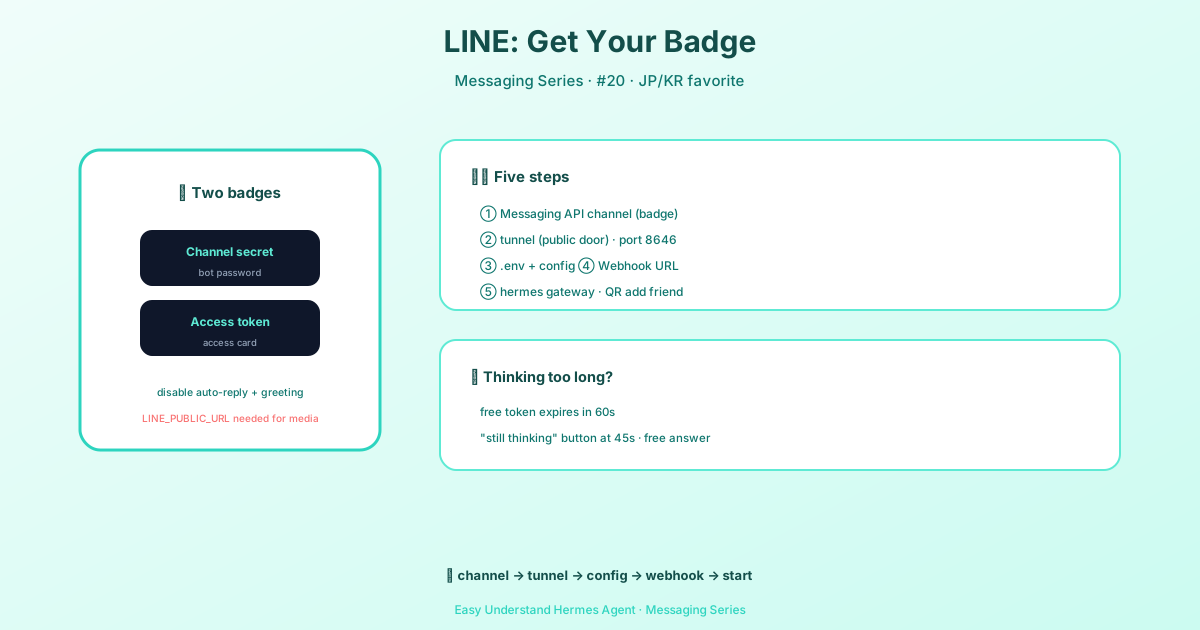
The bot handles all the messy stuff — text, images, audio, video, files, stickers, even location pins. For sending replies, it’s smart about costs too: it first uses the free reply token (valid for about 60 seconds), and only if that expires does it switch to the metered Push API.
Step 1: Get Your LINE Channel Keys
First, you need a Messaging API channel. Head to the LINE Developers Console, create a Provider, then add a Messaging API channel.
Here’s what to grab:
- From Basic settings — copy your Channel secret
- From Messaging API tab — click Issue next to Channel access token (long-lived) and copy that too
- In the same tab, turn off both Auto-reply messages and Greeting messages. Otherwise, LINE’s built-in replies will fight your bot for the conversation.
Step 2: Expose the Webhook Port
LINE needs to send messages to your bot over public HTTPS. The default port is 8646, but you can change it with an environment variable if needed.
# Set a custom port if 8646 is taken
export LINE_PORT=9000
Then run the guided setup:
hermes gateway setupWhen prompted, pick LINE and follow the walk-through. It’ll ask for the channel secret and access token you copied earlier.
Why This Matters
If you’re building for users in Japan, Taiwan, or Thailand, this is the difference between your AI being a fun experiment and being something people actually use daily. LINE isn’t just another app there — it’s how they talk to friends, order food, and now, chat with your AI.
Final Tip
Start with a private 1:1 test. Message your bot yourself before adding it to any group. That way you can verify the webhook is working and the reply token flow feels snappy — all without spamming a real group chat. Once it feels right, add the group ID to your allowlist and let the conversation begin.
📖 Official Docs
This article is based on the official Hermes Agent documentation:Official docs › user-guide/messaging/line