Automate Anything with Cron
Automate Everything with Cron — easy-to-understand guide based on official docs
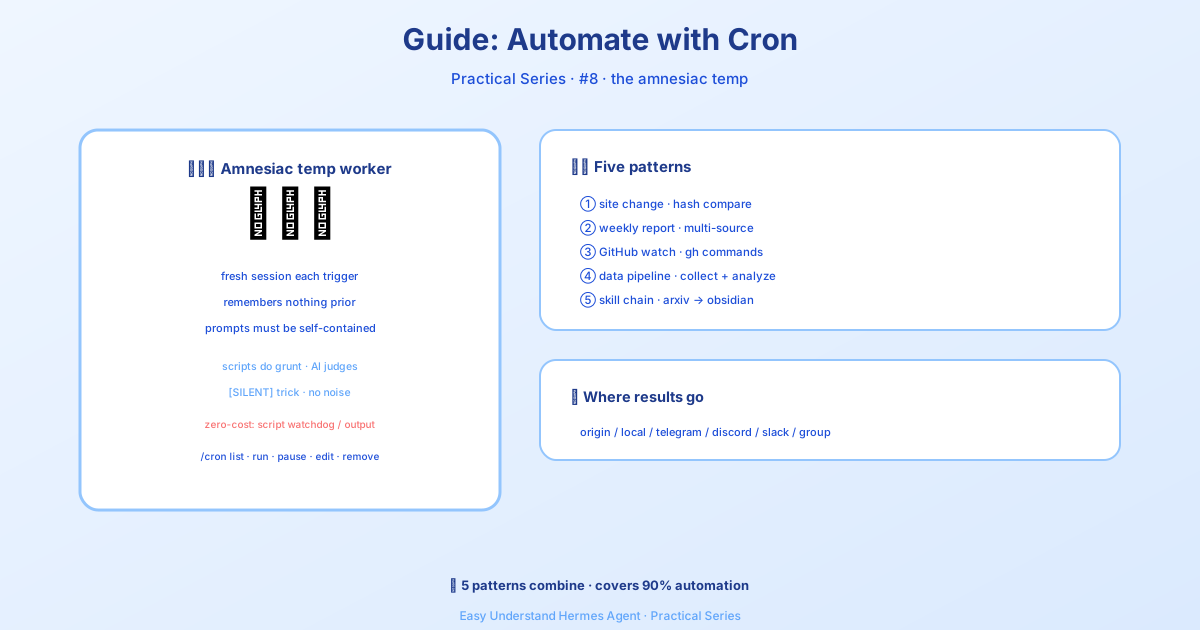
أتمتة كل شيء باستخدام Cron
إذا كنت قد قرأت درس بوت الموجز اليومي، فأنت تعرف بالفعل أساسيات مهام cron. لكن هذا مجرد غيض من فيض. اليوم، سنتعمق أكثر — خمسة أنماط أتمتة واقعية يمكنك استعارتها وتكييفها مع سير عملك.
قبل أن نغوص، إليك القاعدة الذهبية: مهام cron تعمل في جلسات وكيل جديدة تمامًا بلا أي ذاكرة من محادثتك الحالية. يجب أن تكون مطالباتك مكتفية بذاتها تمامًا. ضمّن كل ما يحتاجه الوكيل — الأوامر، السياق، التوقعات. فكّر في الأمر ككتابة تعليمات لمتدرب ذكي جدًا دخل للتو من الباب.
بدائل بدون استهلاك للرموز (وفّر استدعاءات LLM)
ليست كل أتمتة تحتاج إلى LLM. خياران يتيحان لك تخطي تكلفة الرموز تمامًا:
- المراقب الدوري — إذا كان سكربتك ينتج بالفعل الرسالة المطلوبة (تنبيهات الذاكرة، تحذيرات القرص، نبضات القلب)، استخدم مهام cron بالاعتماد على السكربت فقط. نفس المجدول، بدون LLM. فقط اطلب من Hermes في المحادثة — أداة
cronjobتعرف متى تختارno_agent=Trueوتكتب السكربت نيابة عنك. - الإرسال لمرة واحدة من سكربت قيد التشغيل — لخطوات CI، أو خطافات ما بعد الالتزام، أو سكربتات النشر، استخدم
hermes sendلتوجيه stdout أو ملف مباشرة إلى Telegram أو Discord أو Slack وغيرها. لا حاجة لإدخال cron.
النمط 1: مراقب تغييرات المواقع
راقب رابطًا واحصل على إشعار فقط عندما يتغير شيء فعليًا. السلاح السري هنا هو معامل script — سكربت Python يعمل قبل كل تنفيذ، ومخرجاته القياسية تصبح سياقًا للوكيل. السكربت يتولى العمل الميكانيكي (الجلب، المقارنة)؛ والوكيل يتولى الاستنتاج (هل هذا التغيير مثير للاهتمام؟).
أولاً، أنشئ سكربت المراقبة:
mkdir -p ~/.hermes/scriptsimport hashlib, json, os, urllib.request
URL = "https://example.com/pricing"
STATE_FILE = os.path.expanduser("~/.hermes/scripts/.watch-site-state.json")
# Fetch current content
req = urllib.request.Request(URL, headers={"User-Agent": "Hermes-Monitor/1.0"})
content = urllib.request.urlopen(req, timeout=30).read().decode()
current_hash = hashlib.sha256(content.encode()).hexdigest()
# Load previous state
prev_hash = None
if os.path.exists(STATE_FILE):
with open(STATE_FILE) as f:
prev_hash = json.load(f).get("hash")
# Save current state
with open(STATE_FILE, "w") as f:
json.dump({"hash": current_hash, "url": URL}, f)
# Output for the agent
if prev_hash and prev_hash != current_hash:
print(f"CHANGE DETECTED on {URL}")
print(f"Previous hash: {prev_hash}")
print(f"Current hash: {current_hash}")
print(f"\nCurrent content (first 2000 chars):\n{content[:2000]}")
else:
print("NO_CHANGE")الآن أعد إعداد مهمة cron:
/cron add "every 1h" "If the script output says CHANGE DETECTED, summarize what changed on the page and why it might matter. If it says NO_CHANGE, respond with just [SILENT]." --script ~/.hermes/scripts/watch-site.py --name "Pricing monitor" --deliver telegramخدعة [SILENT]: لمهام المراقبة، اطلب من الوكيل الرد بـ [SILENT] فقط عندما لا يتغير شيء. يعامل تسليم cron هذا كعلامة هدوء — لن يتم إشعارك إلا عندما يحدث شيء فعليًا. لا رسائل مزعجة خلال ساعات الهدوء.
النمط 2: التقرير الأسبوعي
اجمع المعلومات من مصادر متعددة في ملخص منسق. يعمل هذا مرة واحدة أسبوعيًا ويُسلَّم إلى قناتك الرئيسية.
/cron add "0 9 * * 1" "Generate a weekly report covering:

1. Search the web for the top 5 AI news stories from the past week
2. Search GitHub for trending repositories in the 'machine-learning' topic
3. Check Hacker News for the most discussed AI/ML posts

Format as a clean summary with sections for each source. Include links.
Keep it under 500 words — highlight only what matters." --name "Weekly AI digest" --deliver telegram
من سطر الأوامر:
hermes cron create "0 9 * * 1" \
  "Generate a weekly report covering the top AI news, trending ML GitHub repos, and most-discussed HN posts. Format with sections, include links, keep under 500 words." \
  --name "Weekly AI digest" \
  --deliver telegram
0 9 * * 1 هو تعبير cron قياسي: الساعة 9:00 صباحًا كل يوم اثنين.
النمط 3: مراقب مستودعات GitHub
راقب مستودعًا للاطلاع على القضايا أو طلبات السحب أو الإصدارات الجديدة.
/cron add "every 6h" "Check the GitHub repository NousResearch/hermes-agent for:
- New issues opened in the last 6 hours
- New PRs opened or merged in the last 6 hours
- Any new releases

Use the terminal to run gh commands:
  gh issue list --repo NousResearch/hermes-agent --state open --json number,title,author,createdAt --limit 10
  gh pr list --repo NousResearch/hermes-agent --state all --json number,title,author,createdAt,mergedAt --limit 10

Filter to only items from the last 6 hours. If nothing new, respond with [SILENT].
Otherwise, provide a concise summary of the activity." --name "Repo watcher" --deliver discord
المطالبات المكتفية بذاتها مهمة. لاحظ كيف يتضمن المطالب أوامر gh الدقيقة. وكيل cron ليس لديه أي سجل محادثة من التشغيلات السابقة — اشرح كل شيء بالتفصيل. (الذاكرة المستمرة تُحمَّل بالفعل، لذا التفضيلات الدائمة المحفوظة في MEMORY.md تنتقل، لكن لا تعتمد عليها للتفاصيل الحساسة للمهمة.)
النمط 4: خط أنابيب جمع البيانات
اجمع البيانات على فترات منتظمة، واحفظها في ملفات، واكتشف الاتجاهات بمرور الوقت. يجمع هذا النمط بين سكربت (للتجميع) والوكيل (للتحليل).
import json, os, urllib.request
from datetime import datetime

DATA_DIR = os.path.expanduser("~/.hermes/data/prices")
os.makedirs(DATA_DIR, exist_ok=True)

# Fetch current data (example: crypto prices)
url = "https://api.coingecko.com/api/v3/simple/price?ids=bitcoin,ethereum&vs_currencies=usd"
data = json.loads(urllib.request.urlopen(url, timeout=30).read())

# Append to history file
entry = {"timestamp": datetime.now().isoformat(), "prices": data}
history_file = os.path.join(DATA_DIR, "history.jsonl")
with open(history_file, "a") as f:
    f.write(json.dumps(entry) + "\n")

# Output for the agent
print(f"Collected prices at {entry['timestamp']}: {data}")
ثم أعد إعداد مهمة cron تشغّل السكربت وتطلب من الوكيل تحليل البيانات المجمعة:
/cron add "every 30m" "Run the collection script, then analyze the price history in ~/.hermes/data/prices/history.jsonl. If you notice a significant trend (more than 5% change in the last hour), summarize it. Otherwise respond with [SILENT]." --script ~/.hermes/scripts/collect-prices.py --name "Price tracker" --deliver telegramالنمط 5: نهج “فقط اسأل”
لا تريد كتابة سكربتات أو تذكر صيغة cron؟ فقط صف ما تريده بلغة عادية:
/cron add "every 2h" "Check if there are any new articles about AI regulation on Google News. If there are, summarize the top 3. If nothing new, respond with [SILENT]." --name "AI regulation watch" --deliver telegramالوكيل يتولى الباقي — البحث على الويب، وتصفية النتائج، وتنسيق المخرجات.
الخلاصة
تغطي هذه الأنماط الخمسة أكثر سيناريوهات الأتمتة شيوعًا: المراقبة، والتقارير، ومتابعة المستودعات، وجمع البيانات، ومهام “فقط اسأل” البسيطة. النقاط الرئيسية:
- السكربتات تتولى العمل الميكانيكي — الجلب، المقارنة، التجميع
- الوكلاء يتولون الاستنتاج — هل هذا مثير للاهتمام؟ ما الذي تغير؟ لماذا يهم؟
[SILENT]يبقيك بعيدًا عن البريد المزعج — لن يتم إشعارك إلا عندما يحدث شيء مهم فعلاً- المطالبات المكتفية بذاتها غير قابلة للتفاوض — الوكيل يبدأ من الصفر في كل مرة
للاطلاع على مرجع الميزات الكامل، راجع وثائق المهام المجدولة (Cron). أتمتة سعيدة!
📖 التوثيق الرسمي
この記事は Hermes Agent のالتوثيق الرسميに基づいています:التوثيق الرسمي › guides/automate-with-cron