Automatizza Qualsiasi Cosa con Cron
Automate Everything with Cron — easy-to-understand guide based on official docs
Automatizza Qualsiasi Cosa con Cron
Se hai letto il nostro tutorial sul bot di briefing giornaliero, conosci già le basi dei cron job. Ma quella è solo la punta dell’iceberg. Oggi andiamo più a fondo — cinque pattern di automazione reali che puoi rubare e adattare ai tuoi flussi di lavoro.
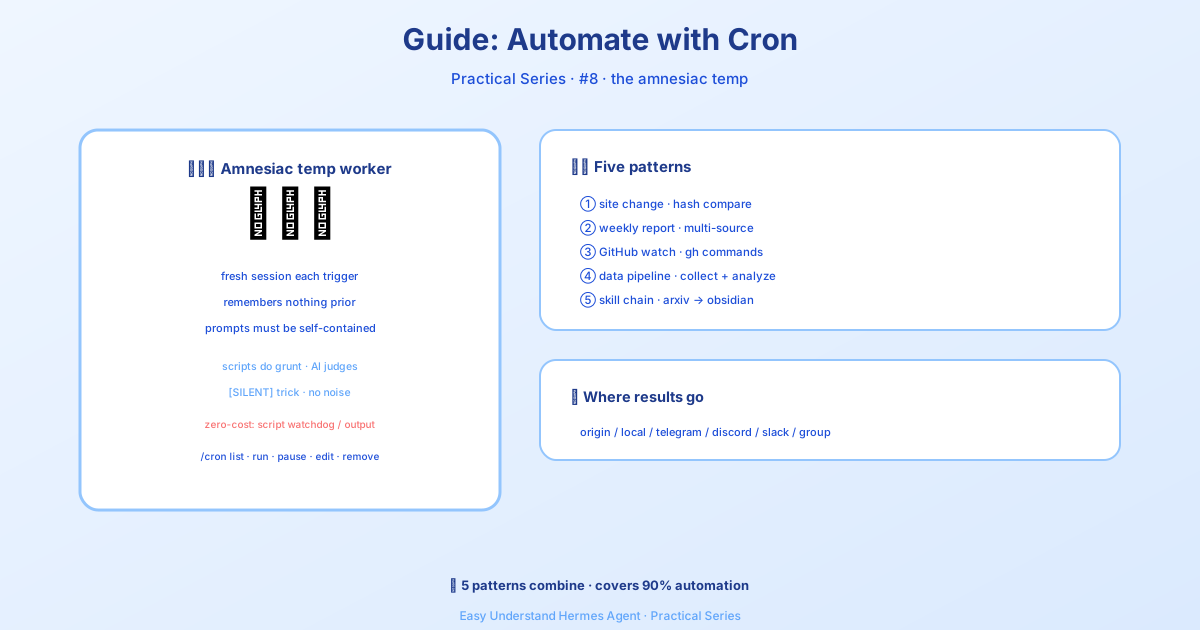
Prima di immergerci, ecco la regola d’oro: i cron job vengono eseguiti in sessioni agente nuove di zecca, senza memoria della tua chat corrente. I tuoi prompt devono essere completamente autonomi. Includi tutto ciò di cui l’agente ha bisogno — comandi, contesto, aspettative. Pensalo come scrivere istruzioni per uno stagista molto intelligente che è appena entrato dalla porta.
Alternative a Zero Token (Risparmia le Tue Chiamate LLM)
Non ogni automazione ha bisogno di un LLM. Due opzioni ti permettono di saltare del tutto il costo dei token:
- Watchdog ricorrente — se il tuo script produce già il messaggio esatto (avvisi di memoria, avvisi disco, heartbeat), usa i cron job solo-script. Stesso scheduler, nessun LLM. Basta chiedere a Hermes in chat — lo strumento
cronjobsa quando scegliereno_agent=Truee scrive lo script per te. - One-shot da uno script in esecuzione — per step CI, hook post-commit o script di deploy, usa
hermes sendper inviare stdout o un file direttamente a Telegram, Discord, Slack, ecc. Nessuna voce cron necessaria.
Pattern 1: Monitoraggio Modifiche Sito Web
Osserva un URL e ricevi notifiche solo quando qualcosa cambia davvero. L’arma segreta qui è il parametro script — uno script Python viene eseguito prima di ogni esecuzione, e il suo stdout diventa contesto per l’agente. Lo script gestisce il lavoro meccanico (fetch, diff); l’agente gestisce il ragionamento (questo cambiamento è interessante?).
Prima, crea lo script di monitoraggio:
mkdir -p ~/.hermes/scriptsimport hashlib, json, os, urllib.request
URL = "https://example.com/pricing"
STATE_FILE = os.path.expanduser("~/.hermes/scripts/.watch-site-state.json")
# Fetch current content
req = urllib.request.Request(URL, headers={"User-Agent": "Hermes-Monitor/1.0"})
content = urllib.request.urlopen(req, timeout=30).read().decode()
current_hash = hashlib.sha256(content.encode()).hexdigest()
# Load previous state
prev_hash = None
if os.path.exists(STATE_FILE):
with open(STATE_FILE) as f:
prev_hash = json.load(f).get("hash")
# Save current state
with open(STATE_FILE, "w") as f:
json.dump({"hash": current_hash, "url": URL}, f)
# Output for the agent
if prev_hash and prev_hash != current_hash:
print(f"CHANGE DETECTED on {URL}")
print(f"Previous hash: {prev_hash}")
print(f"Current hash: {current_hash}")
print(f"\nCurrent content (first 2000 chars):\n{content[:2000]}")
else:
print("NO_CHANGE")Ora imposta il cron job:
/cron add "every 1h" "If the script output says CHANGE DETECTED, summarize what changed on the page and why it might matter. If it says NO_CHANGE, respond with just [SILENT]." --script ~/.hermes/scripts/watch-site.py --name "Pricing monitor" --deliver telegramIl trucco [SILENT]: Per i job di monitoraggio, dì all’agente di rispondere solo con [SILENT] quando non è cambiato nulla. La consegna cron lo tratta come marcatore silenzioso — ricevi notifiche solo quando qualcosa succede davvero. Niente spam durante le ore tranquille.
Pattern 2: Report Settimanale
Compila informazioni da più fonti in un riepilogo formattato. Viene eseguito una volta a settimana e consegna al tuo canale principale.
/cron add "0 9 * * 1" "Generate a weekly report covering:

1. Search the web for the top 5 AI news stories from the past week
2. Search GitHub for trending repositories in the 'machine-learning' topic
3. Check Hacker News for the most discussed AI/ML posts

Format as a clean summary with sections for each source. Include links.
Keep it under 500 words — highlight only what matters." --name "Weekly AI digest" --deliver telegram
Dalla CLI:
hermes cron create "0 9 * * 1" \
  "Generate a weekly report covering the top AI news, trending ML GitHub repos, and most-discussed HN posts. Format with sections, include links, keep under 500 words." \
  --name "Weekly AI digest" \
  --deliver telegram
Il 0 9 * * 1 è un’espressione cron standard: le 9:00 ogni lunedì.
Pattern 3: Osservatore Repository GitHub
Monitora un repository per nuove issue, PR o release.
/cron add "every 6h" "Check the GitHub repository NousResearch/hermes-agent for:
- New issues opened in the last 6 hours
- New PRs opened or merged in the last 6 hours
- Any new releases

Use the terminal to run gh commands:
  gh issue list --repo NousResearch/hermes-agent --state open --json number,title,author,createdAt --limit 10
  gh pr list --repo NousResearch/hermes-agent --state all --json number,title,author,createdAt,mergedAt --limit 10

Filter to only items from the last 6 hours. If nothing new, respond with [SILENT].
Otherwise, provide a concise summary of the activity." --name "Repo watcher" --deliver discord
I prompt autonomi contano. Nota come il prompt include i comandi gh esatti. L’agente cron non ha cronologia di conversazione dalle esecuzioni precedenti — scrivi tutto per esteso. (La memoria persistente viene caricata, quindi le preferenze durature salvate in MEMORY.md vengono mantenute, ma non fare affidamento su di essa per dettagli critici del lavoro.)
Pattern 4: Pipeline di Raccolta Dati
Raccogli dati a intervalli regolari, salvali su file e rileva tendenze nel tempo. Questo pattern combina uno script (per la raccolta) con l’agente (per l’analisi).
import json, os, urllib.request
from datetime import datetime

DATA_DIR = os.path.expanduser("~/.hermes/data/prices")
os.makedirs(DATA_DIR, exist_ok=True)

# Fetch current data (example: crypto prices)
url = "https://api.coingecko.com/api/v3/simple/price?ids=bitcoin,ethereum&vs_currencies=usd"
data = json.loads(urllib.request.urlopen(url, timeout=30).read())

# Append to history file
entry = {"timestamp": datetime.now().isoformat(), "prices": data}
history_file = os.path.join(DATA_DIR, "history.jsonl")
with open(history_file, "a") as f:
    f.write(json.dumps(entry) + "\n")

# Output for the agent
print(f"Collected prices at {entry['timestamp']}: {data}")
Poi imposta un cron job che esegue lo script e chiede all’agente di analizzare i dati raccolti:
/cron add "every 30m" "Run the collection script, then analyze the price history in ~/.hermes/data/prices/history.jsonl. If you notice a significant trend (more than 5% change in the last hour), summarize it. Otherwise respond with [SILENT]." --script ~/.hermes/scripts/collect-prices.py --name "Price tracker" --deliver telegramPattern 5: L’Approccio “Basta Chiedere”
Non vuoi scrivere script o ricordare la sintassi cron? Descrivi semplicemente ciò che vuoi in italiano semplice:
/cron add "every 2h" "Check if there are any new articles about AI regulation on Google News. If there are, summarize the top 3. If nothing new, respond with [SILENT]." --name "AI regulation watch" --deliver telegramL’agente capisce il resto — cercare sul web, filtrare i risultati e formattare l’output.
Conclusioni
Questi cinque pattern coprono gli scenari di automazione più comuni: monitoraggio, report, osservazione repository, raccolta dati e semplici lavori “basta chiedere”. I punti chiave:
- Gli script gestiscono il lavoro meccanico — fetch, diff, raccolta
- Gli agenti gestiscono il ragionamento — è interessante? cosa è cambiato? perché importa?
[SILENT]ti tiene libero dallo spam — ricevi notifiche solo quando qualcosa conta davvero- I prompt autonomi non sono negoziabili — l’agente parte da zero ogni volta
Per il riferimento completo alle funzionalità, consulta la documentazione Attività Pianificate (Cron). Buona automazione!
📖 Documentazione ufficiale
この記事は Hermes Agent のDocumentazione ufficialeに基づいています:Documentazione ufficiale › guides/automate-with-cron