Automate Anything with Cron
Automate Everything with Cron — easy-to-understand guide based on official docs
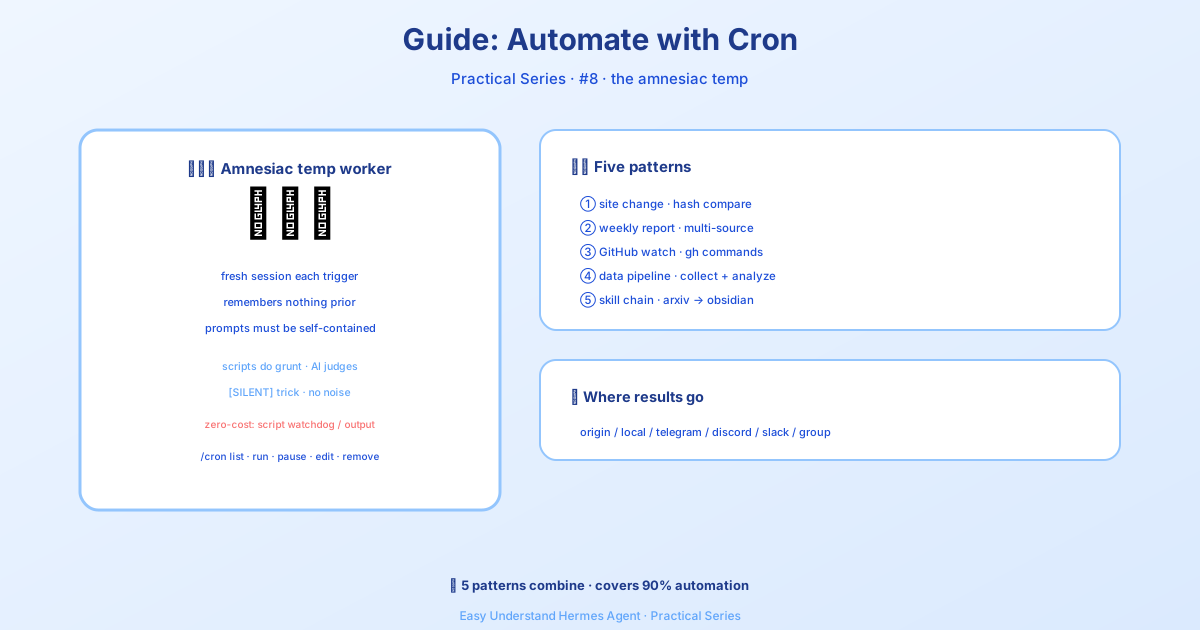
Otomatiskan Semua Hal dengan Cron
Kalau kamu sudah baca tutorial bot briefing harian, kamu pasti sudah paham dasar-dasar cron job. Tapi itu baru permukaan saja. Hari ini kita akan bahas lebih dalam — lima pola otomasi dunia nyata yang bisa kamu contek dan sesuaikan dengan workflow-mu sendiri.
Sebelum masuk ke intinya, ini aturan emasnya: cron job berjalan di sesi agen yang benar-benar baru, tanpa ingatan tentang chat kamu saat ini. Prompt kamu harus benar-benar mandiri. Sertakan semua yang perlu diketahui agen — perintah, konteks, ekspektasi. Anggap saja seperti menulis instruksi untuk anak magang yang sangat pintar tapi baru saja masuk ruangan.
Alternatif Tanpa Token (Hemat Pemakaian LLM)
Nggak semua otomasi butuh LLM. Ada dua opsi yang bisa bikin kamu skip biaya token sepenuhnya:
- Watchdog berulang — kalau script kamu sudah menghasilkan pesan yang tepat (alerts memori, peringatan disk, heartbeat), pakai cron job khusus script. Jadwalnya sama, tanpa LLM. Tinggal minta Hermes di chat — tool
cronjobtahu kapan harus pakaino_agent=Truedan nulis script-nya buat kamu. - One-shot dari script yang berjalan — untuk langkah CI, post-commit hooks, atau script deploy, pakai
hermes senduntuk mengalirkan stdout atau file langsung ke Telegram, Discord, Slack, dll. Nggak perlu entri cron.
Pola 1: Monitor Perubahan Website
Pantau sebuah URL dan dapatkan notifikasi hanya kalau ada yang benar-benar berubah. Senjata rahasianya adalah parameter script — script Python dijalankan sebelum setiap eksekusi, dan stdout-nya menjadi konteks untuk agen. Script yang mengurus kerjaan mekanis (fetching, diffing); agen yang mengurus penalaran (perubahan ini menarik nggak?).
Pertama, buat script monitoring-nya:
mkdir -p ~/.hermes/scriptsimport hashlib, json, os, urllib.request
URL = "https://example.com/pricing"
STATE_FILE = os.path.expanduser("~/.hermes/scripts/.watch-site-state.json")
# Fetch current content
req = urllib.request.Request(URL, headers={"User-Agent": "Hermes-Monitor/1.0"})
content = urllib.request.urlopen(req, timeout=30).read().decode()
current_hash = hashlib.sha256(content.encode()).hexdigest()
# Load previous state
prev_hash = None
if os.path.exists(STATE_FILE):
with open(STATE_FILE) as f:
prev_hash = json.load(f).get("hash")
# Save current state
with open(STATE_FILE, "w") as f:
json.dump({"hash": current_hash, "url": URL}, f)
# Output for the agent
if prev_hash and prev_hash != current_hash:
print(f"CHANGE DETECTED on {URL}")
print(f"Previous hash: {prev_hash}")
print(f"Current hash: {current_hash}")
print(f"\nCurrent content (first 2000 chars):\n{content[:2000]}")
else:
print("NO_CHANGE")Sekarang atur cron job-nya:
/cron add "every 1h" "If the script output says CHANGE DETECTED, summarize what changed on the page and why it might matter. If it says NO_CHANGE, respond with just [SILENT]." --script ~/.hermes/scripts/watch-site.py --name "Pricing monitor" --deliver telegramTrik [SILENT]: Untuk job monitoring, suruh agen merespons hanya dengan [SILENT] kalau nggak ada yang berubah. Pengiriman cron menganggap ini sebagai penanda diam — kamu cuma dapat notifikasi kalau sesuatu benar-benar terjadi. Nggak ada spam di jam-jam sepi.
Pola 2: Laporan Mingguan
Kumpulkan informasi dari berbagai sumber menjadi ringkasan yang rapi. Ini jalan seminggu sekali dan dikirim ke channel utama kamu.
/cron add "0 9 * * 1" "Generate a weekly report covering:

1. Search the web for the top 5 AI news stories from the past week
2. Search GitHub for trending repositories in the 'machine-learning' topic
3. Check Hacker News for the most discussed AI/ML posts

Format as a clean summary with sections for each source. Include links.
Keep it under 500 words — highlight only what matters." --name "Weekly AI digest" --deliver telegram
Dari CLI:
hermes cron create "0 9 * * 1" \
  "Generate a weekly report covering the top AI news, trending ML GitHub repos, and most-discussed HN posts. Format with sections, include links, keep under 500 words." \
  --name "Weekly AI digest" \
  --deliver telegram
0 9 * * 1 adalah ekspresi cron standar: jam 9:00 pagi setiap hari Senin.
Pola 3: Pengawas Repositori GitHub
Pantau sebuah repositori untuk issue, PR, atau rilis baru.
/cron add "every 6h" "Check the GitHub repository NousResearch/hermes-agent for:
- New issues opened in the last 6 hours
- New PRs opened or merged in the last 6 hours
- Any new releases

Use the terminal to run gh commands:
  gh issue list --repo NousResearch/hermes-agent --state open --json number,title,author,createdAt --limit 10
  gh pr list --repo NousResearch/hermes-agent --state all --json number,title,author,createdAt,mergedAt --limit 10

Filter to only items from the last 6 hours. If nothing new, respond with [SILENT].
Otherwise, provide a concise summary of the activity." --name "Repo watcher" --deliver discord
Prompt yang mandiri itu penting. Perhatikan bagaimana prompt menyertakan perintah gh yang persis. Agen cron tidak punya riwayat percakapan dari eksekusi sebelumnya — tulis semuanya secara eksplisit. (Memori persisten memang dimuat, jadi preferensi yang tersimpan di MEMORY.md akan terbawa, tapi jangan andalkan itu untuk detail yang penting bagi job.)
Pola 4: Pipeline Pengumpulan Data
Ambil data secara berkala, simpan ke file, dan deteksi tren dari waktu ke waktu. Pola ini menggabungkan script (untuk pengumpulan) dengan agen (untuk analisis).
import json, os, urllib.request
from datetime import datetime

DATA_DIR = os.path.expanduser("~/.hermes/data/prices")
os.makedirs(DATA_DIR, exist_ok=True)

# Fetch current data (example: crypto prices)
url = "https://api.coingecko.com/api/v3/simple/price?ids=bitcoin,ethereum&vs_currencies=usd"
data = json.loads(urllib.request.urlopen(url, timeout=30).read())

# Append to history file
entry = {"timestamp": datetime.now().isoformat(), "prices": data}
history_file = os.path.join(DATA_DIR, "history.jsonl")
with open(history_file, "a") as f:
    f.write(json.dumps(entry) + "\n")

# Output for the agent
print(f"Collected prices at {entry['timestamp']}: {data}")
Lalu atur cron job yang menjalankan script dan meminta agen menganalisis data yang terkumpul:
/cron add "every 30m" "Run the collection script, then analyze the price history in ~/.hermes/data/prices/history.jsonl. If you notice a significant trend (more than 5% change in the last hour), summarize it. Otherwise respond with [SILENT]." --script ~/.hermes/scripts/collect-prices.py --name "Price tracker" --deliver telegramPola 5: Pendekatan “Tinggal Minta”
Nggak mau nulis script atau hafal sintaks cron? Tinggal deskripsikan apa yang kamu mau dalam bahasa sehari-hari:
/cron add "every 2h" "Check if there are any new articles about AI regulation on Google News. If there are, summarize the top 3. If nothing new, respond with [SILENT]." --name "AI regulation watch" --deliver telegramAgen yang mengurus sisanya — mencari di web, menyaring hasil, dan memformat output.
Penutup
Lima pola ini mencakup skenario otomasi yang paling umum: monitoring, pelaporan, pengawasan repo, pengumpulan data, dan job “tinggal minta” yang sederhana. Poin-poin utamanya:
- Script mengurus kerjaan mekanis — fetching, diffing, mengumpulkan
- Agen mengurus penalaran — ini menarik nggak? apa yang berubah? kenapa ini penting?
[SILENT]bikin kamu bebas spam — cuma dapat notifikasi kalau sesuatu benar-benar penting- Prompt yang mandiri itu harga mati — agen mulai dari nol setiap kali
Untuk referensi fitur lengkap, cek dokumentasi Tugas Terjadwal (Cron). Selamat mengotomasi!
📖 Dokumentasi resmi
この記事は Hermes Agent のDokumentasi resmiに基づいています:Dokumentasi resmi › guides/automate-with-cron