あらゆることをCronで自動化する
Automate Everything with Cron — easy-to-understand guide based on official docs
あらゆることをCronで自動化する
デイリーブリーフィングボットのチュートリアルを読んだ方なら、cronジョブの基本はすでにご存知でしょう。でも、それは氷山の一角にすぎません。今日はもっと深掘りします — 実際のワークフローにそのまま使える、5つの実践的な自動化パターンを紹介します。
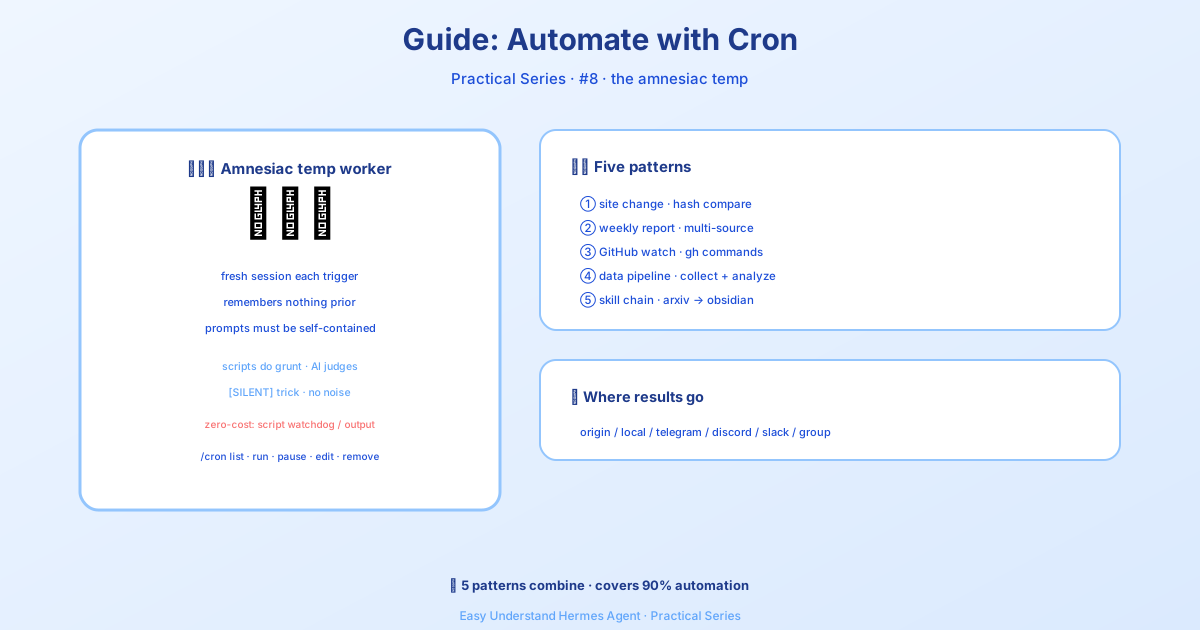
本題に入る前に、黄金ルールをひとつ:cronジョブは現在のチャットの記憶を持たない、まっさらなエージェントセッションで実行されます。 プロンプトは完全に自己完結型である必要があります。エージェントが必要とするすべての情報 — コマンド、コンテキスト、期待する出力 — を含めてください。ちょうど、入ってきたばかりの優秀なインターンに指示書を書くようなイメージです。
トークン消費ゼロの代替案(LLM呼び出しを節約)
すべての自動化にLLMが必要なわけではありません。トークンコストを完全にスキップできる2つのオプションがあります:
- 定期ウォッチドッグ — スクリプトがすでに正確なメッセージを生成している場合(メモリ警告、ディスク警告、ハートビートなど)は、スクリプト専用cronジョブを使いましょう。同じスケジューラで、LLMは不要です。チャットでHermesに頼むだけで、
cronjobツールがno_agent=Trueを選ぶべきタイミングを判断し、スクリプトを書いてくれます。 - 実行中スクリプトからのワンショット送信 — CIステップ、コミット後フック、デプロイスクリプトなどには、
hermes sendを使ってstdoutやファイルをTelegram、Discord、Slackなどに直接パイプできます。cronエントリは不要です。
パターン1:ウェブサイト変更モニター
URLを監視して、実際に変更があったときだけ通知を受け取ります。ここでの秘密兵器はscriptパラメータ — Pythonスクリプトが各実行の前に動作し、そのstdoutがエージェントのコンテキストになります。スクリプトは機械的な作業(取得、差分比較)を担当し、エージェントは判断(この変更は興味深いか?)を担当します。
まず、監視スクリプトを作成します:
mkdir -p ~/.hermes/scriptsimport hashlib, json, os, urllib.request
URL = "https://example.com/pricing"
STATE_FILE = os.path.expanduser("~/.hermes/scripts/.watch-site-state.json")
# Fetch current content
req = urllib.request.Request(URL, headers={"User-Agent": "Hermes-Monitor/1.0"})
content = urllib.request.urlopen(req, timeout=30).read().decode()
current_hash = hashlib.sha256(content.encode()).hexdigest()
# Load previous state
prev_hash = None
if os.path.exists(STATE_FILE):
with open(STATE_FILE) as f:
prev_hash = json.load(f).get("hash")
# Save current state
with open(STATE_FILE, "w") as f:
json.dump({"hash": current_hash, "url": URL}, f)
# Output for the agent
if prev_hash and prev_hash != current_hash:
print(f"CHANGE DETECTED on {URL}")
print(f"Previous hash: {prev_hash}")
print(f"Current hash: {current_hash}")
print(f"\nCurrent content (first 2000 chars):\n{content[:2000]}")
else:
print("NO_CHANGE")次に、cronジョブを設定します:
/cron add "every 1h" "If the script output says CHANGE DETECTED, summarize what changed on the page and why it might matter. If it says NO_CHANGE, respond with just [SILENT]." --script ~/.hermes/scripts/watch-site.py --name "Pricing monitor" --deliver telegram[SILENT]のトリック: 監視ジョブでは、変更がない場合にエージェントに[SILENT]とだけ返答するよう指示します。cron配信はこれを「静かにしておく」マーカーとして扱うので、実際に何かが起きたときだけ通知が届きます。静かな時間帯にスパムが届くことはありません。
パターン2:週次レポート
複数のソースから情報を収集し、フォーマット済みのサマリーにまとめます。週に1回実行され、ホームチャンネルに配信されます。
/cron add "0 9 * * 1" "Generate a weekly report covering:

1. Search the web for the top 5 AI news stories from the past week
2. Search GitHub for trending repositories in the 'machine-learning' topic
3. Check Hacker News for the most discussed AI/ML posts

Format as a clean summary with sections for each source. Include links.
Keep it under 500 words — highlight only what matters." --name "Weekly AI digest" --deliver telegram
CLIから:
hermes cron create "0 9 * * 1" \
  "Generate a weekly report covering the top AI news, trending ML GitHub repos, and most-discussed HN posts. Format with sections, include links, keep under 500 words." \
  --name "Weekly AI digest" \
  --deliver telegram
0 9 * * 1は標準的なcron式です:毎週月曜日の午前9時を意味します。
パターン3:GitHubリポジトリウォッチャー
リポジトリの新しいIssue、PR、リリースを監視します。
/cron add "every 6h" "Check the GitHub repository NousResearch/hermes-agent for:
- New issues opened in the last 6 hours
- New PRs opened or merged in the last 6 hours
- Any new releases

Use the terminal to run gh commands:
  gh issue list --repo NousResearch/hermes-agent --state open --json number,title,author,createdAt --limit 10
  gh pr list --repo NousResearch/hermes-agent --state all --json number,title,author,createdAt,mergedAt --limit 10

Filter to only items from the last 6 hours. If nothing new, respond with [SILENT].
Otherwise, provide a concise summary of the activity." --name "Repo watcher" --deliver discord
自己完結型プロンプトが重要な理由。 プロンプトに正確なghコマンドが含まれていることに注目してください。cronエージェントには以前の実行からの会話履歴がありません — すべてを明示的に書く必要があります。(永続メモリは読み込まれるので、MEMORY.mdに保存された長期的な設定は引き継がれますが、ジョブの重要情報をそれに依存するのは避けましょう。)
パターン4:データ収集パイプライン
定期的にデータをスクレイピングし、ファイルに保存し、時間の経過に伴うトレンドを検出します。このパターンは、スクリプト(収集用)とエージェント(分析用)を組み合わせます。
import json, os, urllib.request
from datetime import datetime

DATA_DIR = os.path.expanduser("~/.hermes/data/prices")
os.makedirs(DATA_DIR, exist_ok=True)

# Fetch current data (example: crypto prices)
url = "https://api.coingecko.com/api/v3/simple/price?ids=bitcoin,ethereum&vs_currencies=usd"
data = json.loads(urllib.request.urlopen(url, timeout=30).read())

# Append to history file
entry = {"timestamp": datetime.now().isoformat(), "prices": data}
history_file = os.path.join(DATA_DIR, "history.jsonl")
with open(history_file, "a") as f:
    f.write(json.dumps(entry) + "\n")

# Output for the agent
print(f"Collected prices at {entry['timestamp']}: {data}")
次に、スクリプトを実行して収集データを分析するようエージェントに依頼するcronジョブを設定します:
/cron add "every 30m" "Run the collection script, then analyze the price history in ~/.hermes/data/prices/history.jsonl. If you notice a significant trend (more than 5% change in the last hour), summarize it. Otherwise respond with [SILENT]." --script ~/.hermes/scripts/collect-prices.py --name "Price tracker" --deliver telegramパターン5:「とりあえず聞く」アプローチ
スクリプトを書いたり、cron構文を覚えたりしたくない? やりたいことを普通の言葉で説明するだけです:
/cron add "every 2h" "Check if there are any new articles about AI regulation on Google News. If there are, summarize the top 3. If nothing new, respond with [SILENT]." --name "AI regulation watch" --deliver telegramエージェントが残りをすべて解決します — ウェブ検索、結果のフィルタリング、出力のフォーマットまで。
まとめ
この5つのパターンで、最も一般的な自動化シナリオをカバーできます:監視、レポート、リポジトリ監視、データ収集、そしてシンプルな「とりあえず聞く」ジョブ。重要なポイントは次のとおりです:
- スクリプトは機械的な作業を担当 — 取得、差分比較、収集
- エージェントは判断を担当 — これは興味深いか? 何が変わったか? なぜ重要か?
[SILENT]でスパム回避 — 実際に重要なことが起きたときだけ通知- 自己完結型プロンプトは必須 — エージェントは毎回まっさらな状態から始まります
完全な機能リファレンスは、スケジュールタスク(Cron)のドキュメントをご覧ください。自動化を楽しんでください!
📖 公式ドキュメント
この記事は Hermes Agent の公式ドキュメントに基づいています:公式ドキュメント › guides/automate-with-cron