Cron으로 모든 것을 자동화하기
Automate Everything with Cron — easy-to-understand guide based on official docs
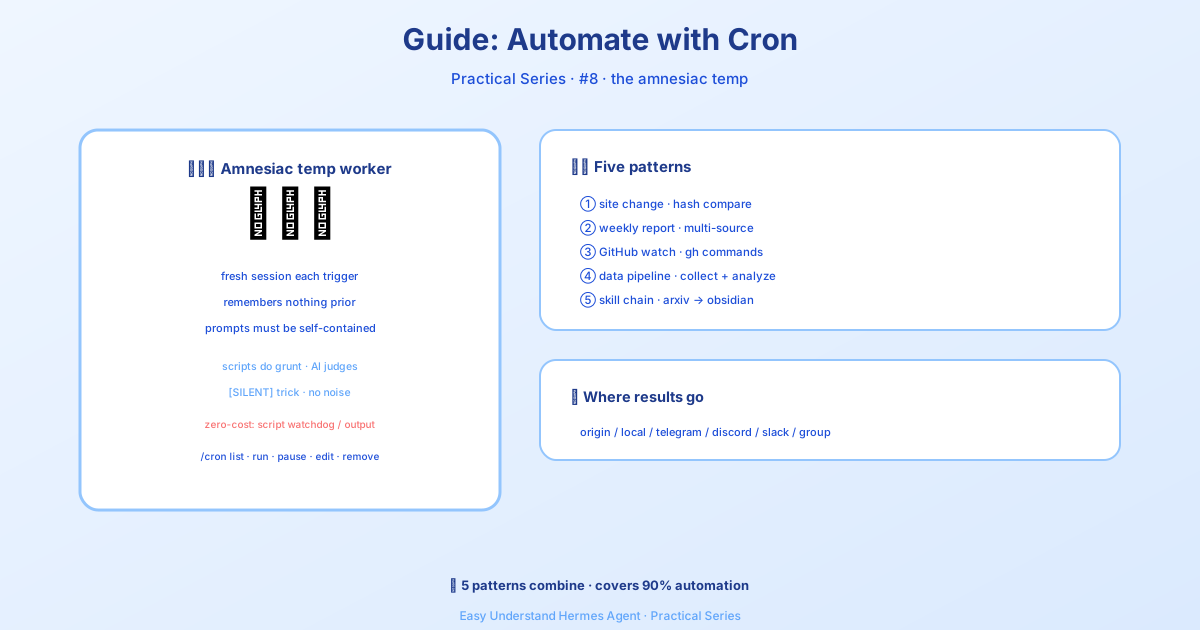
Cron으로 모든 것을 자동화하기
cron 작업의 기초는 이미 데일리 브리핑 봇 튜토리얼에서 배우셨을 겁니다. 하지만 그건 빙산의 일각에 불과해요. 오늘은 더 깊이 들어가 봅니다 — 여러분의 워크플로우에 적용할 수 있는 다섯 가지 실전 자동화 패턴을 소개합니다.
본격적으로 시작하기 전에, 가장 중요한 규칙 하나를 알려드릴게요: cron 작업은 현재 채팅의 기억이 없는 새로운 에이전트 세션에서 실행됩니다. 프롬프트는 완전히 독립적이어야 해요. 에이전트가 알아야 할 모든 것 — 명령어, 맥락, 기대사항 — 을 포함하세요. 막 들어온 아주 똑똑한 인턴에게 지시사항을 적는 것처럼 생각하면 됩니다.
토큰 제로 대안 (LLM 호출 절약하기)
모든 자동화에 LLM이 필요한 건 아닙니다. 토큰 비용을 완전히 건너뛸 수 있는 두 가지 옵션이 있어요:
- 반복 워치독(Watchdog) — 스크립트가 이미 정확한 메시지를 생성한다면 (메모리 알림, 디스크 경고, 하트비트 등), 스크립트 전용 cron 작업을 사용하세요. 동일한 스케줄러에 LLM 없이 말이죠. 채팅에서 Hermes에게 요청하기만 하면 됩니다.
cronjob도구가 언제no_agent=True를 선택해야 하는지 알고 스크립트를 작성해 줍니다. - 실행 중인 스크립트에서 원샷 전송 — CI 단계, 커밋 후 훅, 또는 배포 스크립트의 경우,
hermes send를 사용하여 stdout이나 파일을 Telegram, Discord, Slack 등으로 직접 파이프하세요. cron 항목이 필요 없습니다.
패턴 1: 웹사이트 변경 모니터
URL을 감시하다가 실제로 변경이 있을 때만 알림을 받는 방법입니다. 여기서 핵심은 script 파라미터입니다 — Python 스크립트가 각 실행 전에 실행되고, 그 stdout이 에이전트의 컨텍스트가 됩니다. 스크립트는 기계적인 작업(가져오기, 비교)을 처리하고, 에이전트는 추론(이 변경이 흥미로운가?)을 담당합니다.
먼저 모니터링 스크립트를 만듭니다:
mkdir -p ~/.hermes/scriptsimport hashlib, json, os, urllib.request
URL = "https://example.com/pricing"
STATE_FILE = os.path.expanduser("~/.hermes/scripts/.watch-site-state.json")
# 현재 콘텐츠 가져오기
req = urllib.request.Request(URL, headers={"User-Agent": "Hermes-Monitor/1.0"})
content = urllib.request.urlopen(req, timeout=30).read().decode()
current_hash = hashlib.sha256(content.encode()).hexdigest()
# 이전 상태 불러오기
prev_hash = None
if os.path.exists(STATE_FILE):
with open(STATE_FILE) as f:
prev_hash = json.load(f).get("hash")
# 현재 상태 저장
with open(STATE_FILE, "w") as f:
json.dump({"hash": current_hash, "url": URL}, f)
# 에이전트를 위한 출력
if prev_hash and prev_hash != current_hash:
print(f"CHANGE DETECTED on {URL}")
print(f"Previous hash: {prev_hash}")
print(f"Current hash: {current_hash}")
print(f"\nCurrent content (first 2000 chars):\n{content[:2000]}")
else:
print("NO_CHANGE")이제 cron 작업을 설정합니다:
/cron add "every 1h" "If the script output says CHANGE DETECTED, summarize what changed on the page and why it might matter. If it says NO_CHANGE, respond with just [SILENT]." --script ~/.hermes/scripts/watch-site.py --name "Pricing monitor" --deliver telegram[SILENT] 트릭: 모니터링 작업의 경우, 변경 사항이 없을 때 에이전트에게 [SILENT]만 응답하라고 지시하세요. Cron 전달은 이걸 조용한 표시로 처리합니다 — 실제로 무언가 발생할 때만 알림을 받게 됩니다. 조용한 시간에 스팸이 오지 않아요.
패턴 2: 주간 리포트
여러 소스의 정보를 종합하여 형식화된 요약으로 만듭니다. 이 작업은 일주일에 한 번 실행되어 홈 채널로 전달됩니다.
/cron add "0 9 * * 1" "Generate a weekly report covering:

1. Search the web for the top 5 AI news stories from the past week
2. Search GitHub for trending repositories in the 'machine-learning' topic
3. Check Hacker News for the most discussed AI/ML posts

Format as a clean summary with sections for each source. Include links.
Keep it under 500 words — highlight only what matters." --name "Weekly AI digest" --deliver telegram
CLI에서:
hermes cron create "0 9 * * 1" \
  "Generate a weekly report covering the top AI news, trending ML GitHub repos, and most-discussed HN posts. Format with sections, include links, keep under 500 words." \
  --name "Weekly AI digest" \
  --deliver telegram
0 9 * * 1은 표준 cron 표현식입니다: 매주 월요일 오전 9시.
패턴 3: GitHub 저장소 감시자
저장소에서 새로운 이슈, PR, 또는 릴리스를 모니터링합니다.
/cron add "every 6h" "Check the GitHub repository NousResearch/hermes-agent for:
- New issues opened in the last 6 hours
- New PRs opened or merged in the last 6 hours
- Any new releases

Use the terminal to run gh commands:
  gh issue list --repo NousResearch/hermes-agent --state open --json number,title,author,createdAt --limit 10
  gh pr list --repo NousResearch/hermes-agent --state all --json number,title,author,createdAt,mergedAt --limit 10

Filter to only items from the last 6 hours. If nothing new, respond with [SILENT].
Otherwise, provide a concise summary of the activity." --name "Repo watcher" --deliver discord
자족적 프롬프트가 중요합니다. 프롬프트에 정확한 gh 명령어가 포함되어 있는 것에 주목하세요. Cron 에이전트는 이전 실행의 대화 기록이 없습니다 — 모든 것을 명시하세요. (영구 메모리는 로드되므로 MEMORY.md에 저장된 지속적 선호사항은 전달되지만, 작업에 중요한 세부사항을 그것에 의존하지 마세요.)
패턴 4: 데이터 수집 파이프라인
정기적인 간격으로 데이터를 스크래핑하고, 파일에 저장하고, 시간에 따른 추세를 감지합니다. 이 패턴은 스크립트(수집용)와 에이전트(분석용)를 결합합니다.
import json, os, urllib.request
from datetime import datetime

DATA_DIR = os.path.expanduser("~/.hermes/data/prices")
os.makedirs(DATA_DIR, exist_ok=True)

# 현재 데이터 가져오기 (예: 암호화폐 가격)
url = "https://api.coingecko.com/api/v3/simple/price?ids=bitcoin,ethereum&vs_currencies=usd"
data = json.loads(urllib.request.urlopen(url, timeout=30).read())

# 히스토리 파일에 추가
entry = {"timestamp": datetime.now().isoformat(), "prices": data}
history_file = os.path.join(DATA_DIR, "history.jsonl")
with open(history_file, "a") as f:
    f.write(json.dumps(entry) + "\n")

# 에이전트를 위한 출력
print(f"Collected prices at {entry['timestamp']}: {data}")
그런 다음 스크립트를 실행하고 수집된 데이터를 분석하도록 에이전트에게 요청하는 cron 작업을 설정합니다:
/cron add "every 30m" "Run the collection script, then analyze the price history in ~/.hermes/data/prices/history.jsonl. If you notice a significant trend (more than 5% change in the last hour), summarize it. Otherwise respond with [SILENT]." --script ~/.hermes/scripts/collect-prices.py --name "Price tracker" --deliver telegram패턴 5: “그냥 요청하기” 방식
스크립트를 작성하거나 cron 문법을 기억하고 싶지 않으신가요? 원하는 것을 평범한 영어로 설명하기만 하면 됩니다:
/cron add "every 2h" "Check if there are any new articles about AI regulation on Google News. If there are, summarize the top 3. If nothing new, respond with [SILENT]." --name "AI regulation watch" --deliver telegram에이전트가 나머지를 알아서 처리합니다 — 웹 검색, 결과 필터링, 출력 형식 지정까지.
마무리
이 다섯 가지 패턴은 가장 일반적인 자동화 시나리오를 다룹니다: 모니터링, 리포팅, 저장소 감시, 데이터 수집, 그리고 간단한 “그냥 요청” 작업까지. 핵심 요점은 다음과 같습니다:
- 스크립트는 기계적인 작업을 처리합니다 — 가져오기, 비교, 수집
- 에이전트는 추론을 담당합니다 — 이게 흥미로운가? 무엇이 바뀌었나? 왜 중요한가?
[SILENT]는 스팸을 방지합니다 — 실제로 중요한 일이 있을 때만 알림을 받습니다- 자족적 프롬프트는 필수입니다 — 에이전트는 매번 새로 시작합니다
전체 기능 참조는 예약 작업 (Cron) 문서를 확인하세요. 자동화를 즐기세요!
📖 공식 문서
この記事は Hermes Agent の공식 문서に基づいています:공식 문서 › guides/automate-with-cron