实战:用定时任务自动化一切
Hermes 实战教程第8篇:定时任务自动化。让 AI 按时干活。
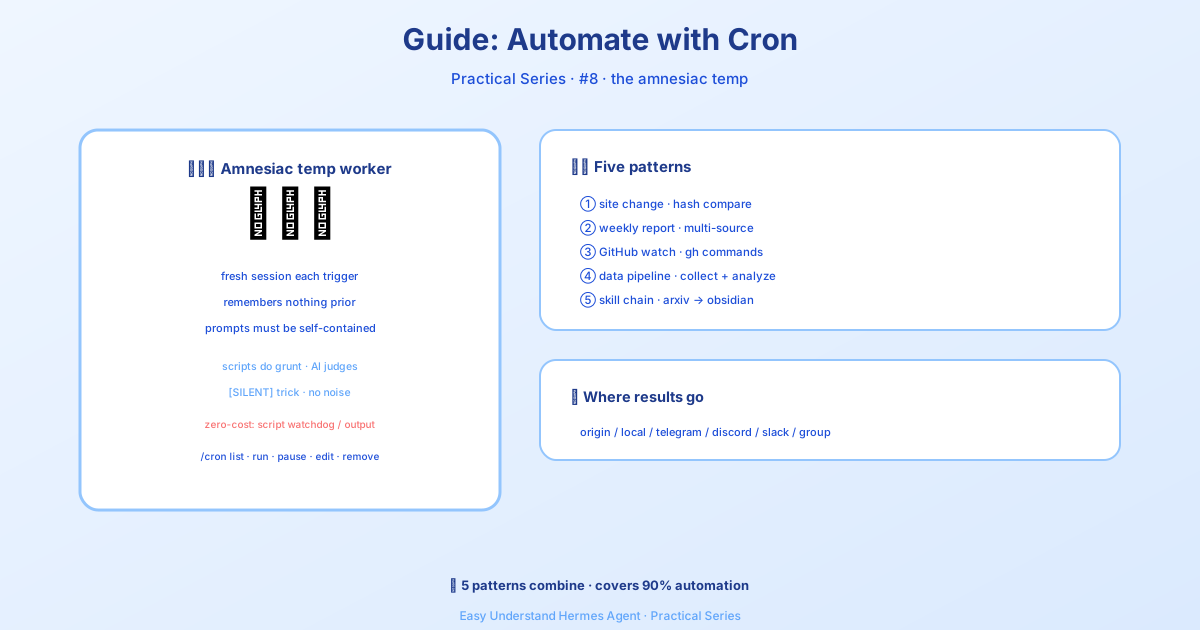
實戰:用定時任務自動化一切
上一期我們聊了每日簡報機器人,今天來點更硬核的——用 Cron 定時任務把重複勞動全交給 Hermes。官方文件剛更新了五個實戰模式,我挑最實用的四個給你拆解。
核心概念:Cron 任務沒有「記憶」
先記住這句話:Cron 任務每次都在全新的會話裡運行,它不記得你上次聊了什麼。所以你的提示詞必須自包含——把 agent 需要知道的一切都寫進去。
另外,如果你不需要 LLM 參與,還有兩個零 token 消耗的選項:
- 純腳本定時任務:腳本直接產出最終訊息(比如記憶體告警、磁碟告警),用
no_agent=True模式 - 一次性腳本輸出:用
hermes send把 stdout 直接推送到 Telegram/Discord,根本不用建 cron
模式一:網站變更監控
想盯住某個網頁,變了才通知你?script 參數是秘密武器——腳本先跑,它的 stdout 變成 agent 的上下文。腳本乾機械活(抓取、比對),agent 乾思考活(這變化值得關注嗎?)。
先建監控腳本:
mkdir -p ~/.hermes/scriptsimport hashlib, json, os, urllib.request
URL = "https://example.com/pricing"
STATE_FILE = os.path.expanduser("~/.hermes/scripts/.watch-site-state.json")
# 抓取目前內容
req = urllib.request.Request(URL, headers={"User-Agent": "Hermes-Monitor/1.0"})
content = urllib.request.urlopen(req, timeout=30).read().decode()
current_hash = hashlib.sha256(content.encode()).hexdigest()
# 讀取上次狀態
prev_hash = None
if os.path.exists(STATE_FILE):
with open(STATE_FILE) as f:
prev_hash = json.load(f).get("hash")
# 儲存目前狀態
with open(STATE_FILE, "w") as f:
json.dump({"hash": current_hash, "url": URL}, f)
# 輸出給 agent
if prev_hash and prev_hash != current_hash:
print(f"CHANGE DETECTED on {URL}")
print(f"Previous hash: {prev_hash}")
print(f"Current hash: {current_hash}")
print(f"\nCurrent content (first 2000 chars):\n{content[:2000]}")
else:
print("NO_CHANGE")然後建定時任務:
/cron add "every 1h" "If the script output says CHANGE DETECTED, summarize what changed on the page and why it might matter. If it says NO_CHANGE, respond with just [SILENT]." --script ~/.hermes/scripts/watch-site.py --name "Pricing monitor" --deliver telegram💡 [SILENT] 技巧:監控類任務讓 agent 沒事就回 [SILENT],Cron 投遞會自動靜默,你只在真有事情時才收到通知——安靜時段不騷擾。
模式二:每週報告
每週一早上 9 點,自動彙整多源資訊。在聊天裡直接:
/cron add "0 9 * * 1" "Generate a weekly report covering:

1. Search the web for the top 5 AI news stories from the past week
2. Search GitHub for trending repositories in the 'machine-learning' topic
3. Check Hacker News for the most discussed AI/ML posts

Format as a clean summary with sections for each source. Include links.
Keep it under 500 words — highlight only what matters." --name "Weekly AI digest" --deliver telegram
CLI 裡等價寫法:
hermes cron create "0 9 * * 1" \
  "Generate a weekly report covering the top AI news, trending ML GitHub repos, and most-discussed HN posts. Format with sections, include links, keep under 500 words." \
  --name "Weekly AI digest" \
  --deliver telegram
0 9 * * 1 是標準 cron 表達式:每週一 9:00。
模式三:GitHub 倉庫監控
盯倉庫的新 issue、PR 和 release:
/cron add "every 6h" "Check the GitHub repository NousResearch/hermes-agent for:
- New issues opened in the last 6 hours
- New PRs opened or merged in the last 6 hours
- Any new releases

Use the terminal to run gh commands:
  gh issue list --repo NousResearch/hermes-agent --state open --json number,title,author,createdAt --limit 10
  gh pr list --repo NousResearch/hermes-agent --state all --json number,title,author,createdAt,mergedAt --limit 10

Filter to only items from the last 6 hours. If nothing new, respond with [SILENT].
Otherwise, provide a concise summary of the activity." --name "Repo watcher" --deliver discord
⚠️ 自包含提示詞:注意提示詞裡寫明瞭完整的 gh 命令。Cron agent 沒有歷史對話,把一切都寫清楚。(持久記憶 MEMORY.md 會載入,但別依賴它存關鍵細節。)
模式四:資料採集管線
定時抓資料存檔案,再讓 agent 分析趨勢。腳本負責採集,agent 負責分析:
import json, os, urllib.request
from datetime import datetime

DATA_DIR = os.path.expanduser("~/.hermes/data/prices")
os.makedirs(DATA_DIR, exist_ok=True)

# 抓取目前資料(範例:加密貨幣價格)
url = "https://api.coingecko.com/api/v3/simple/price?ids=bitcoin,ethereum&vs_currencies=usd"
data = json.loads(urllib.request.urlopen(url, timeout=30).read())

# 追加到歷史檔案
entry = {"timestamp": datetime.now().isoformat(), "prices": data}
history_file = os.path.join(DATA_DIR, "history.jsonl")
with open(history_file, "a") as f:
    f.write(json.dumps(entry) + "\n")

# 輸出給 agent
print(f"Collected prices: {data}")
print(f"History file: {history_file}")
然後讓 agent 定期分析趨勢、生成報告。腳本累積資料,agent 負責解讀——完美分工。
小結
這四種模式覆蓋了大部分自動化需求:監控變化、定期彙整、倉庫盯梢、資料累積。核心就三點:腳本乾髒活、agent 乾思考活、[SILENT] 防騷擾。去試試吧,你的 Hermes 能幫你盯著整個網際網路。
📖 官方文档
本文根据 Hermes Agent 官方文档编写,原文见:官方文档 › guides/automate-with-cron