The A2A Long-Task Mystery: Why Jobs Over Two Minutes Keep Failing
Hermes Messaging Platform Integration, Part 38: Three Causes of A2A Long-Running Task Timeouts and How to Fix Them.
Two Hermes instances on separate machines “phone” each other to delegate tasks, but anything over two minutes fails—no matter how you tweak the config. This isn’t voodoo; it’s three small pitfalls stacked together.
The Puzzle: The Two-Minute Curse
Imagine asking your colleague A to process a file for you, with the agreement that they’ll call you with the result when done. But every time the call exceeds two minutes, your end “hangs up” with a “call failed” message. You’ve tried different phones, different lines, even a different office—same problem.
That’s exactly what Hermes users ran into. Two machines each running Hermes, connected via the A2A plugin (Agent-to-Agent open communication protocol). Machine A delegates a task to machine B, and if it takes longer than about 2 minutes, it fails—every single time. The community calls it “long reply breaking progress tracking.” The kicker? Machine B actually finishes the job, but machine A never receives the result.
Cause #1: The Caller Has No Patience
The first pitfall is purely an “impatient caller” problem.
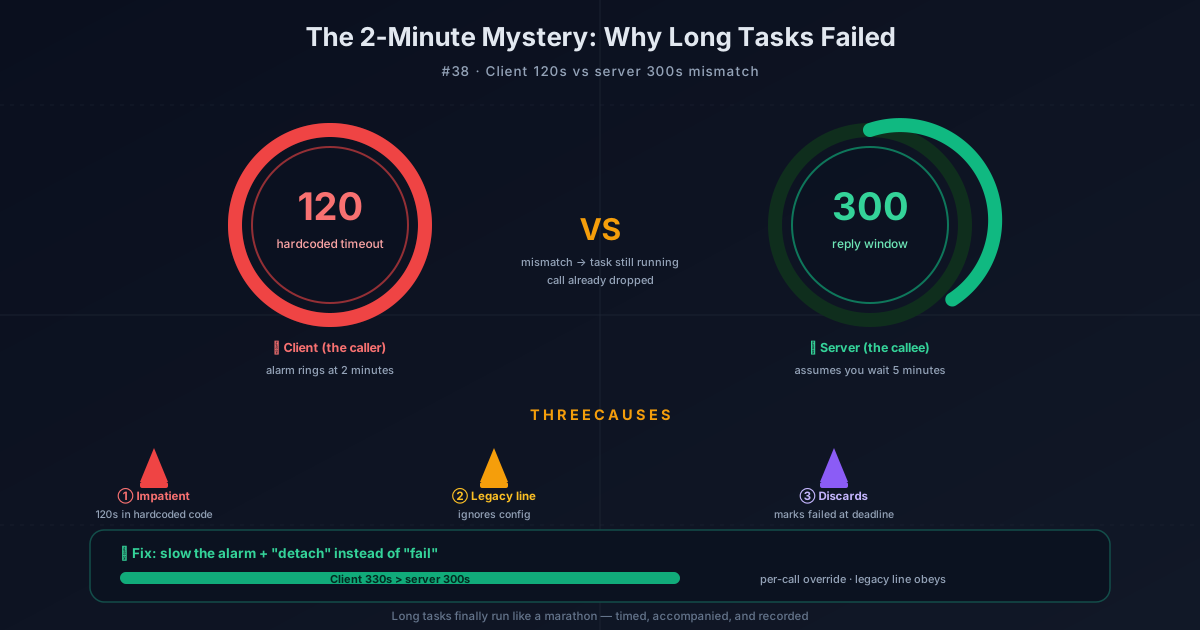
The Hermes client has a default timeout—120 seconds. What does that mean? The caller sets an alarm for themselves: if the other side doesn’t respond within 120 seconds, hang up. But on the server side? It allocates a 300-second reply window for the agent to do its work—that’s 5 minutes.
See the mismatch? The caller hangs up at 2 minutes, while the receiver thinks you have 5 minutes of patience. Result: the task is still running, but the call is already dead. And here’s the kicker—that 120 seconds is hardcoded in the code. Regular users can’t even find where to change it.
Cause #2: The Legacy Line Has No “Timeout” Switch
The second pitfall is a legacy issue.
Hermes offers two ways to invoke A2A: the proper “switchboard transfer” (calling via a configured peer) and the “direct legacy line” (calling directly with a raw URL). The legacy line is a leftover from earlier versions—it also has a hardcoded 120-second timeout internally, and it doesn’t read the config file at all.
In other words, even if you figure out how to change the timeout, the legacy line simply won’t listen. It’s like putting fresh batteries in an old phone—but that phone doesn’t have a volume knob in the first place.
Cause #3: The Server Throws Away Results When Time’s Up
The third pitfall is the sneakiest: the server “clears the field” when the clock runs out.
Say you finally manage to increase the client timeout and survive the first two pitfalls. Then the server side throws another curveball: once the 300-second reply window expires, it marks the task as “failed”—even if the agent is still grinding away. Worse, this “failed” state is sticky—like glue, it won’t come off. When the agent finally finishes and comes back with the result, nobody’s waiting for it, and the result gets discarded.
It’s like a delivery driver clocking out on schedule—the system marks the package as “delivery failed” whether or not it actually arrived. When you receive the package the next day, the tracking info is permanently stuck on “failed,” and there’s no going back.
Step One: Slow Down the Alarm Clock
Once you understand the three pitfalls, the fix is straightforward.
The first fix is simple: change the client default timeout from 120 seconds to 330 seconds. 330 > the server’s 300, so the caller now has more patience than the receiver, and tasks can survive the server’s reply window. Additionally, a2a_call now supports a per-call timeout override parameter—you can set a timeout for an individual task without changing the global setting. The legacy line has also been “modernized”—it now reads the config and inherits authentication and timeout settings.
Step Two: “Detach” Instead of “Fail”
The second fix is smarter. When the server’s clock runs out, it no longer marks the task as failed—it “detaches” it. What does that mean? Think of a customer service hotline queue: if you’ve been waiting too long and don’t want to hold anymore, you can hang up—but your ticket is still in the system, and you’ll get a text notification when it’s handled.
Concretely: when the reply window expires, the caller receives a non-terminal “working” status with guidance attached. The task stays in WORKING state, and the system assigns a “bounded waiter” to keep watching. When the agent actually finishes, the real result is recorded. From then on, whether you query via tasks/get or tasks/resubscribe, observers can see the final outcome. Late-arriving results are no longer thrown away.
Step Three: Bonus Fixes Along the Way
After solving the main case, a few neighboring issues surfaced too.
Streaming reply truncation: Previously, streaming replies might only return the last fragment to the caller. For example, a long event_id string could get truncated to just the second segment, leaving the caller with incomplete data. Now the full accumulated reply is preserved, and all 152 test cases pass.
False completion: When an agent’s iteration budget runs out, the system used to return a “completed” summary—but the peer couldn’t tell the difference between “truncated work” and “successfully completed work,” potentially accepting partial results as complete. Now, truncated tasks explicitly report TASK_STATE_FAILED instead of faking success.
External launchers: Non-root users can now configure external agent launchers to run subprocesses or versioned RPC workers, with support for bounded output, process-tree reaping, cancellation, and exactly-once termination. This resolves three long-standing issues: completion visibility, timeout alignment, and multi-turn continuity.
What This Means for You
Now, when two Hermes instances delegate tasks between each other, jobs over two minutes are no longer doomed to fail. Timeouts are adjustable, and the legacy line finally listens. More importantly, even if the server runs out of patience, the task isn’t “sentenced to death”—it stays in a working state, records the result when done, and you can check it anytime.
Long tasks finally feel like a long-distance run: someone times you, someone runs alongside, someone records your score. Not like before, where the referee blew the whistle mid-run and voided your result.
📖 Official Docs
This article is based on the official Hermes Agent documentation:Official docs › user-guide/messaging/a2a