Discord — AI in Your Server
Discord — AI in Your Server — easy-to-understand guide based on official docs
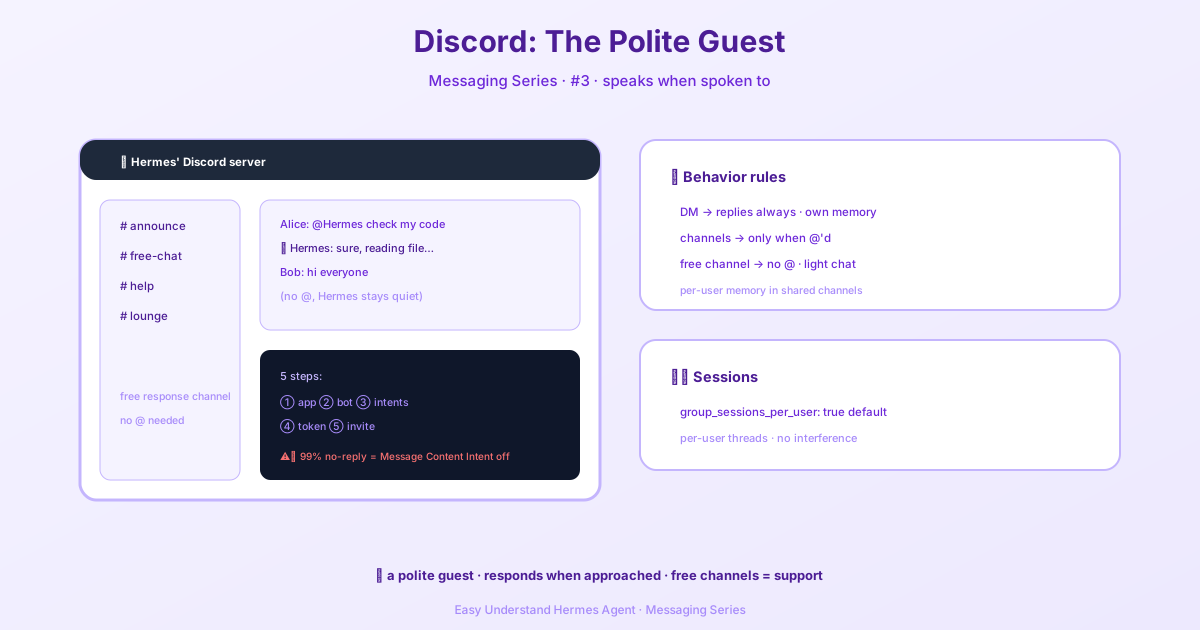
Discord — AI in Your Server
So you want to put Hermes Agent in your Discord server? Great choice. This guide walks you through the whole setup — from creating a bot on Discord’s Developer Portal to having your first conversation with your AI assistant.
But before we dive into the setup, let’s talk about the fun part: how Hermes actually behaves once it’s in your server.
How Hermes Behaves
Hermes isn’t just a dumb bot that replies to everything. It’s smart about when and where it responds. Here’s the breakdown:
| Context | Behavior |
|---|---|
| DMs | Hermes replies to every message. No @mention needed. Each DM gets its own session. |
| Server channels | By default, Hermes only responds when you @mention it. Otherwise, it stays quiet. |
| Free-response channels | Want a channel where people can chat without tagging? Add it to DISCORD_FREE_RESPONSE_CHANNELS (or turn off mentions everywhere with DISCORD_REQUIRE_MENTION=false). Hermes answers inline, skipping auto-threading for a lightweight feel. Prefer a thread per top-level message instead? Set discord.free_response_auto_thread: true. |
| Threads | Hermes replies in the same thread. Mention rules still apply unless the thread or its parent channel is free-response. |
| Shared channels | By default, Hermes keeps each user’s session separate. Alice and Bob talking in #research get two independent conversations. |
| Messages mentioning others | If a message @mentions other people but not Hermes, it stays silent (that’s DISCORD_IGNORE_NO_MENTION=true). Set it to false if you want it to respond to everything. |
Pro tip: Want a normal bot-help channel where people can talk without tagging every time? Add that channel to DISCORD_FREE_RESPONSE_CHANNELS.
The Gateway Model
Here’s what makes Hermes different from a simple webhook: every message goes through the full messaging gateway. That means each incoming message passes through:
- Authorization (via
DISCORD_ALLOWED_USERS) - Mention / free-response checks
- Session lookup
- Session transcript loading
- Full Hermes agent execution — tools, memory, slash commands
- Response delivery back to Discord
This matters in busy servers because behavior depends on both Discord routing and Hermes session policy.
Session Model: Who’s Talking to Whom?
By default, Hermes treats conversations like this:
- Each DM gets its own session
- Each server thread gets its own session namespace
- Each user in a shared channel gets their own session inside that channel
So if Alice and Bob both talk to Hermes in #research, those are two separate conversations — even though they’re in the same visible channel.
This is controlled in config.yaml:
group_sessions_per_user: trueSet it to false if you want one shared conversation for the whole room:
group_sessions_per_user: falseShared sessions can be great for collaborative rooms, but beware: users share context growth and token costs. One person’s long, tool-heavy task can bloat everyone else’s context, and one person’s in-flight run can interrupt another’s follow-up.
Interrupts and Concurrency
Hermes tracks running agents by session key.
With the default group_sessions_per_user: true:
- Alice interrupting her own request only affects Alice’s session
- Bob can keep chatting without inheriting Alice’s history or interrupting her run
With group_sessions_per_user: false:
- The whole room shares one running-agent slot
- Follow-up messages from different people can interrupt or queue behind each other
Gateway WebSocket Health
One important note: Discord REST and the Gateway WebSocket are separate transports. A successful REST response doesn’t prove the bot can still receive Gateway events. Hermes combines ready state, socket closure state, socket openness, heartbeat ACK age, heartbeat latency, and how long it’s been since the last parsed Gateway event to check health.
After a configured number of consecutive unhealthy samples, the adapter emits one retryable fatal event. The reconnect watcher creates a fresh adapter — no unbounded reconnect loops.
Configure the thresholds in config.yaml:
discord:
  websocket_liveness_interval_seconds: 15
  websocket_liveness_failure_threshold: 2
  websocket_heartbeat_ack_max_age_seconds: 60
  websocket_max_latency_seconds: 30
  websocket_event_max_silence_seconds: 14400
The old liveness_interval_seconds and liveness_failure_threshold names still work as compatibility aliases, but they no longer mean REST probing.
Setting any knob to 0 disables the whole WebSocket liveness probe — except websocket_event_max_silence_seconds, which only opts out of the event-silence check while the others keep guarding. A socket can stay connected and keep ACKing heartbeats while delivering zero events, so this last check catches that silent state. The 4-hour default is generous on purpose: a quiet server can legitimately go hours without a single event.
Step 1: Create a Discord Application
- Go to the Discord Developer Portal and sign in.
- Click New Application in the top-right corner.
- Enter a name (e.g., “Hermes Agent”) and accept the Developer Terms of Service.
- Click Create.
You’ll land on the General Information page. Note the Application ID — you’ll need it later to build the invite URL.
Step 2: Create the Bot
- In the left sidebar, click Bot.
- Discord automatically creates a bot user. You can customize its username.
- Under Authorization Flow, set Public Bot to ON — required to use the Discord-provided invite link.
That’s the foundation. From here, you’ll grab your bot token, set your environment variables, and invite Hermes to your server. Once that’s done, you’re ready to start chatting with your AI assistant — whether in DMs, channels, or threads.
📖 Official Docs
This article is based on the official Hermes Agent documentation:Official docs › user-guide/messaging/discord