Voice Mode — Talk to AI
Voice Mode — Talk to AI — easy-to-understand guide based on official docs
Remember the last time your hands were covered in flour, dough, or grease, and you desperately needed to look something up? Typing was out of the question. That’s exactly the problem Hermes Agent’s voice mode solves: it turns AI from something you type at into something you simply talk to.
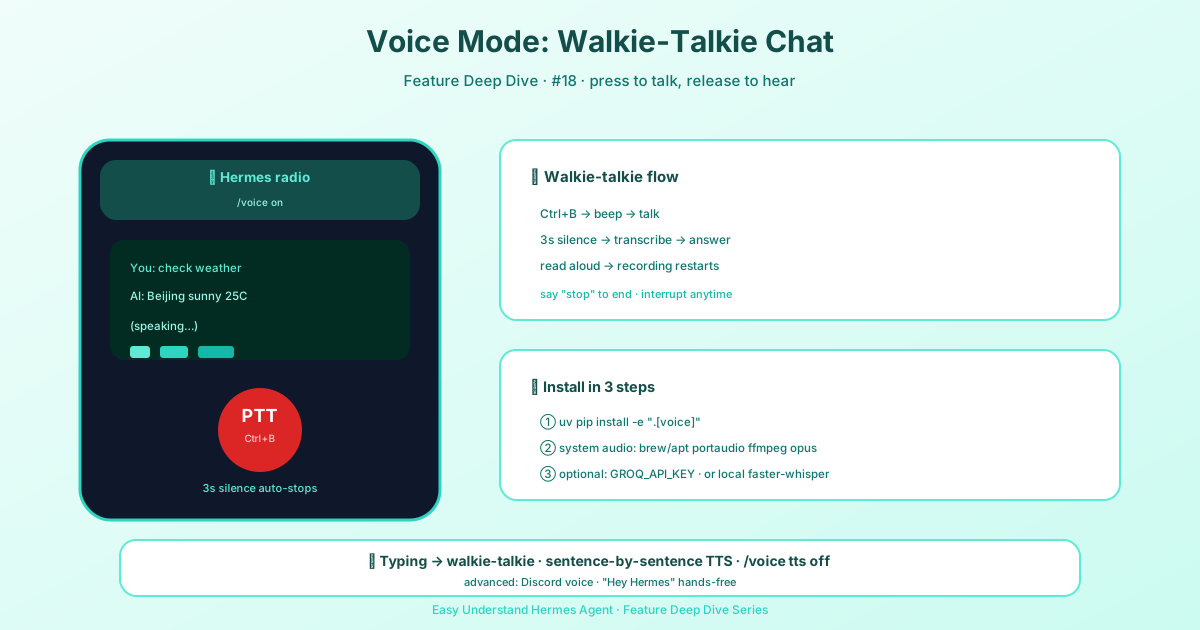
Three Ways to Open Your Mouth
Voice isn’t a single feature—it adapts to where you’re working. Here’s the quick map:
| Feature | Platform | What Happens |
|---|---|---|
| Interactive Voice | Command Line (CLI) | Press Ctrl+B, speak, release—AI answers instantly |
| Auto Voice Replies | Telegram, Discord | Send text, get text plus a spoken reply |
| Voice Channel | Discord | Bot joins the channel and talks with you in real time |
In plain words: press a key on your computer to talk, receive voice replies in chat apps, or “call” the AI inside Discord.
Before You Start: Three Quick Checks
- Install Hermes Agent (see the installation guide)
- Configure your AI model — run
hermes modelor drop your API key into~/.hermes/.env - Confirm text chat works — run
hermesand make sure the AI replies before adding voice
Pro tip: The first time you run
hermes, it creates the~/.hermes/folder andconfig.yamlautomatically. You only need to create~/.hermes/.envyourself for API keys.
Money saver: If you subscribe to Nous Portal, you get both the AI model and text-to-speech (TTS) in one subscription—no separate OpenAI voice key needed. On a fresh install, just run
hermes setup --portaland you’re done.
Three Steps to Start Talking
Step 1: Install the voice dependencies
cd ~/.hermes/hermes-agent && uv pip install -e ".[voice]"Step 2: Launch Hermes
hermesStep 3: Start speaking
- In the terminal: press Ctrl+B, talk, and the AI detects the silence and answers—recording then restarts automatically, so you can keep speaking without pressing any key
- In Telegram or Discord: send a normal message, and the AI automatically adds a voice reply
- In a Discord voice channel: invite the bot in, and it listens and responds live
Level Up: Hands-Free Wake Word
Too lazy to press a button? Set a wake word—say “Hey Hermes” to your computer, and a new voice session starts automatically. Full setup is in the wake word guide.
Desktop: GPT-Live Voice Chat Mode
The desktop app also offers a second voice chat mode that swaps the whole speech-to-text → turn → text-to-speech chain for one full-duplex voice model, OpenAI’s gpt-live-1. It listens while it speaks, handles interruptions and background noise on its own, and has no tools of its own—whenever you ask for real work it delegates to Hermes, which answers with the session’s selected model, full toolset, memory and approvals, and the voice paraphrases the answer aloud. Turn it on with voice.voice_chat_mode: gpt-live in config.yaml or in Settings → Voice → Voice Chat Mode; it needs an OpenAI API key (OPENAI_API_KEY, VOICE_TOOLS_OPENAI_KEY, or voice.gpt_live.api_key) and the voice layer is billed by OpenAI at $0.05 per minute of session time (idle time counts). It isn’t available in the CLI/TUI, where /voice keeps the chained loop.
Final Thoughts and a Practical Tip
Voice mode’s core value is simple: it lowers the barrier from “can type” to “can talk.” For multitasking moments—cooking, driving, crafting—or for anyone who finds keyboards unfriendly, this is a genuine productivity boost.
My practical advice: Start in the terminal with Ctrl+B to get a feel for the rhythm of voice interaction. Once comfortable, move to a Discord voice channel—that’s where the truly immersive, hands-free conversation lives. And if your room is noisy, speak close to the mic; the silence detection works better with a clearer signal.
Keep reading: Buzz AI voice chat — Prefer a dedicated app to the terminal? Buzz AI voice chat is the third route covered in the Buzz guide.
📖 Official Docs
This article is based on the official Hermes Agent documentation:Official docs › user-guide/features/tools