Wake Word — Say Hey Hermes
Wake Word — Say Hey Hermes — easy-to-understand guide based on official docs
You know how you can just say “Hey Siri” to your phone and it snaps to attention? Hermes can do that now, too. Just say “Hey Hermes,” and it will start listening for your next command — no keyboard, no mouse, no touching anything.
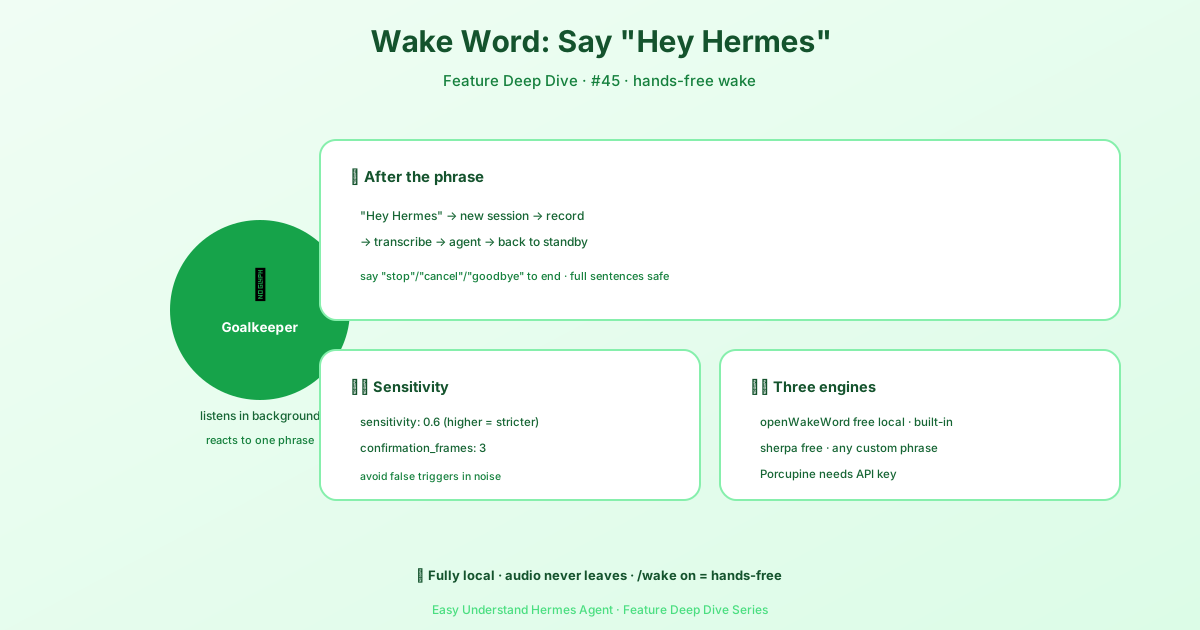
Hands-Free, One Sentence at a Time
Picture this: you’re up to your elbows in flour baking bread, or you’re knee-deep in server logs and can’t spare a hand. You just call out “Hey Hermes,” and it opens its ears, takes your instruction, executes it, and answers you. The whole exchange happens without you ever touching a device.
How It Works
The magic is a simple four-step loop:
- Turn it on: Set
wake_word.enabled: truein your config file, or just type/wake onin a conversation. - Listen in the background: Hermes quietly monitors audio, but only reacts to the one phrase: “Hey Hermes.”
- Start a new round: Once it hears the wake word, it stops listening (freeing up the mic), starts a fresh conversation, and records your first spoken sentence.
- Auto-resume: After it answers, it goes back to standby and waits for the next “Hey Hermes.”
It’s off by default. If you don’t enable it, Hermes never listens. Period.
In the desktop app, hover the microphone in the composer and click the ear that fans out of it. The ear is solid when the wake word is listening.
Is It Private?
Yes. All wake-word detection happens locally on your device. No audio leaves your computer until you’ve actually said the wake word and given a real command. Only that command is sent to Hermes for processing. So your background noise, your side conversations, your cat meowing — none of that ever goes anywhere.
What About Remote Desktops?
If your Hermes runs on a headless server in the cloud with no microphone, no problem. The desktop app automatically switches to “client capture” mode:
- Wake-word detection still runs on the server.
- The microphone used is the one on your local computer.
- Audio travels over an encrypted connection, so no third party can snoop.
You can configure it like this:
wake_word:
  enabled: true
capture: auto # auto | local | clientauto: picks the best option automatically (recommended)local: always uses the server’s micclient: always uses your computer’s mic
How Do You End a Conversation?
In the desktop app, just say “stop” — or “never mind,” “goodbye,” etc. — and the conversation ends, sending Hermes back to standby. It only recognizes complete sentences, so if you say something like “stop the docker container,” that’s a real request and it will execute it normally.
The Bottom Line
The wake word turns Hermes from a tool into an assistant. You don’t have to sit at your desk — you can just call out and get things done. Practical tip: if you’re constantly busy at your computer or curious about true voice interaction, give this a try. First, make sure your microphone works. Then set wake_word.enabled: true in your config, restart, and you’re ready to say “Hey Hermes!”
📖 Official Docs
This article is based on the official Hermes Agent documentation:Official docs › user-guide/features/wake-word