Mixture of Agents — Smarter Answers
Mixture of Agents — Smarter Answers — easy-to-understand guide based on official docs
Mixture of Agents — Smarter Answers
Welcome back to our series on getting the most out of Hermes Agent! Today, we’re diving into something that sounds complicated but is actually pretty simple once you see it in action: configuring models.
Think of it like this: your agent has a “brain” (the main model) and a bunch of “helpers” (auxiliary models). Each helper has a specific job, and you get to choose who does what. Let’s break it down.
The Two Kinds of Model Slots
Hermes uses two types of model slots:
- Main model — This is the thinker. Every message you send, every tool call, every streamed response goes through this model. It’s the star of the show.
- Auxiliary models — These are the side-kicks. They handle smaller tasks like compressing long conversations, analyzing images, summarizing web pages, scoring approvals, routing MCP tools, generating session titles, and searching for skills. Each has its own slot, and you can override them independently.
Getting Started: The Fastest Path
If you’re new, the quickest way to get going is with Nous Portal. It gives you access to 300+ models under one subscription. On a fresh install, just run:
hermes setup --portalThis logs you in and sets Nous as your provider in one command. You can check what’s wired up with hermes portal info. Bonus: Portal subscribers get 10% off token-billed providers.
The Models Page
Open the dashboard and click Models in the sidebar. You’ll see two sections:
- Model Settings — the top panel where you assign models to slots.
- Usage analytics — ranked cards showing every model that ran a session, with token counts, cost, and capability badges.
The top card is the Model Settings panel. The main row shows what the agent will spin up for new sessions. Click Change to open the picker.
Setting the Main Model
The picker has two columns:
- Left — authenticated providers. Only providers you’ve set up (API key, OAuth, or custom endpoint) show up here. If a provider is missing, head to Keys and add its credential.
- Right — the curated model list for the selected provider. These are the agentic models Hermes recommends, not the raw
/modelsdump (which on OpenRouter includes 400+ models including TTS and image generators).
Type in the filter box to narrow by provider name, slug, or model ID. Pick a model, hit Switch, and Hermes writes it to your config file.
Important: This applies to new sessions only. Any chat tab you already have open keeps running whatever model it started with. To hot-swap the current chat, use the /model slash command inside it.
Mid-Session Switches and Context Warnings
When you switch models inside an active session, Hermes checks whether your next message will run preflight context compression against the new model’s window. If the session is already near or above that model’s compression threshold, you’ll get a warning. The switch still applies immediately; compression runs on the first user message after the switch.
Pro tip: Mid-session switches reset the prompt cache. Prompt caches are keyed to the model serving the request, so any mid-conversation change means the next message re-reads the entire conversation at full input-token price instead of the cached (~75–90% discounted) rate. On a long session, this one-time re-read can dwarf the per-token difference between the two models. Switch when you need to, but prefer doing it early in a conversation.
Unattended Data-Training Tiers
Some models are discounted because the vendor may train on your prompts and completions. Interactive model selection always shows a confirmation prompt. But non-interactive startup paths (like Kanban workers and cron agents) fail closed because they can’t ask that question.
If training on the unattended workload’s data is acceptable, record a persistent acknowledgement:
hermes config set security.allow_data_training_tiers_noninteractive trueHermes still prints the full data-policy warning on every unattended startup, so worker logs retain an audit trail. Revoke it with:
hermes config unset security.allow_data_training_tiers_noninteractiveSetting Auxiliary Models
Click Show auxiliary to reveal the 11 task slots. Every auxiliary task defaults to auto — meaning Hermes tries your main model for that job too. If that route is unavailable, auto follows any task-specific fallback chain, then the main fallback chain, then Hermes’ built-in auxiliary discovery chain.
Override a specific task when you want a cheaper or faster model for a side-job. For example, you might use a small, fast model for session-title generation and keep your powerful main model for the heavy thinking.
Mixture of Agents
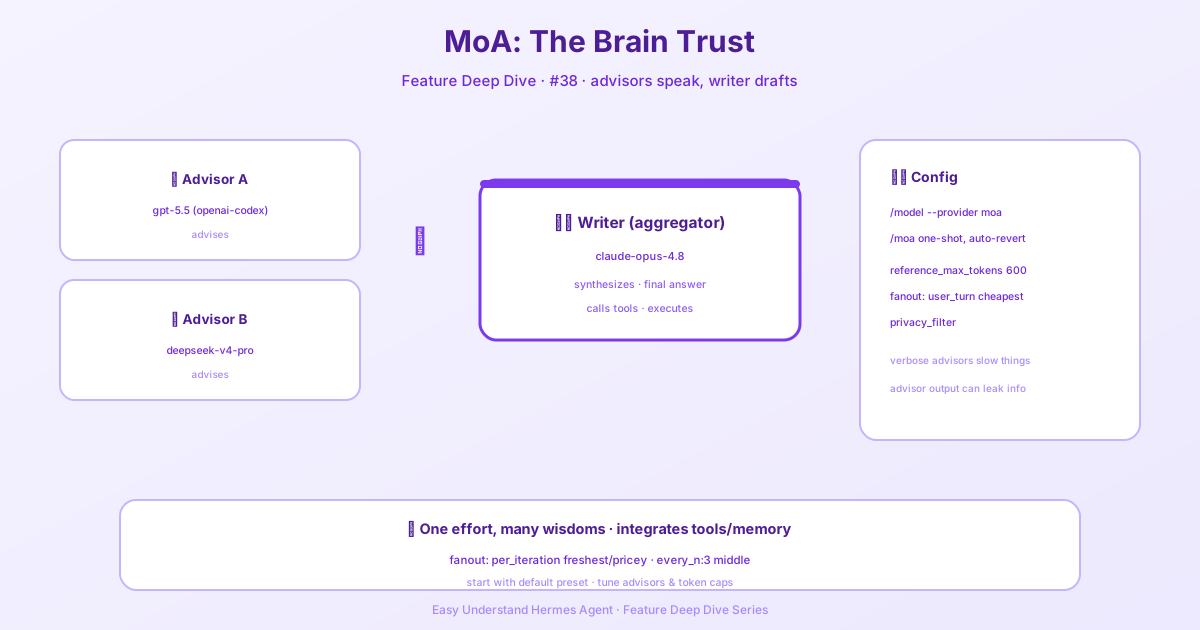
Mixture of Agents is a virtual model provider: each named MoA preset appears as a selectable model under the moa provider, and when you select one, the preset’s aggregator is the acting model while the reference models run first to provide analysis. Select a preset with /model <preset> --provider moa (or /model --provider moa for the default), or use the one-shot /moa <prompt> shortcut, which runs a single prompt through the default preset and then restores your previous model. Configure presets from the Dashboard or Desktop under Mixture of Agents, via hermes moa configure [name], or in config.yaml.
Who pays for a MoA run: the aggregator is billed for the whole run, since it runs every step of the tool loop. References only advise once per user turn (with the default fanout). So if your main model is on a subscription but the aggregator sits elsewhere, the run is billed to the aggregator’s provider — not your subscription. hermes moa configure and hermes moa list print a one-line notice whenever the aggregator’s provider differs from your main model.provider, and the Desktop editor, hermes model, and /model mark the aggregator slot as the acting, billed model.
MoA also keeps your prompt cache intact. The reference outputs are appended as their own trailing user message of private guidance — never merged into your message — so they sit below the stable prefix and don’t invalidate any cached prefix. The aggregator gets a cache hit on everything above the injection, and only the freshly appended tail is new. (On some strict chat templates that reject two adjacent user messages, Hermes retries that one request with them merged and remembers the destination for the rest of the session.) The only real cost is the extra reference calls — you pay for multiple model perspectives, not for broken caches.
A preset can also be a fallback entry (fallback_providers: [{provider: moa, model: <preset>}]). When the primary fails, Hermes activates the preset itself — references and aggregator — the same way /model <preset> --provider moa does. The entry is skipped if the preset doesn’t resolve or its aggregator has no credentials.
Wrapping Up
Configuring models in Hermes is all about finding the right balance between power and efficiency. Start with the defaults, see how things perform, then tweak the auxiliary slots to optimize cost and speed. The dashboard makes it visual, and the CLI gives you fine-grained control.
Happy building!
📖 Official Docs
This article is based on the official Hermes Agent documentation:Official docs › user-guide/features/mixture-of-agents