Document Extraction — Scans to Text
Document Extraction — Scans to Text — easy-to-understand guide based on official docs
Imagine handing a colleague a contract, and they flip through it saying, “This is all pictures, I can’t read a word.” That’s the exact problem we’re fixing today. Hermes Agent’s read_file tool can now “open” files like a human — turning PDFs, Word docs, Excel sheets, and even legacy Office files into plain text it can actually understand.
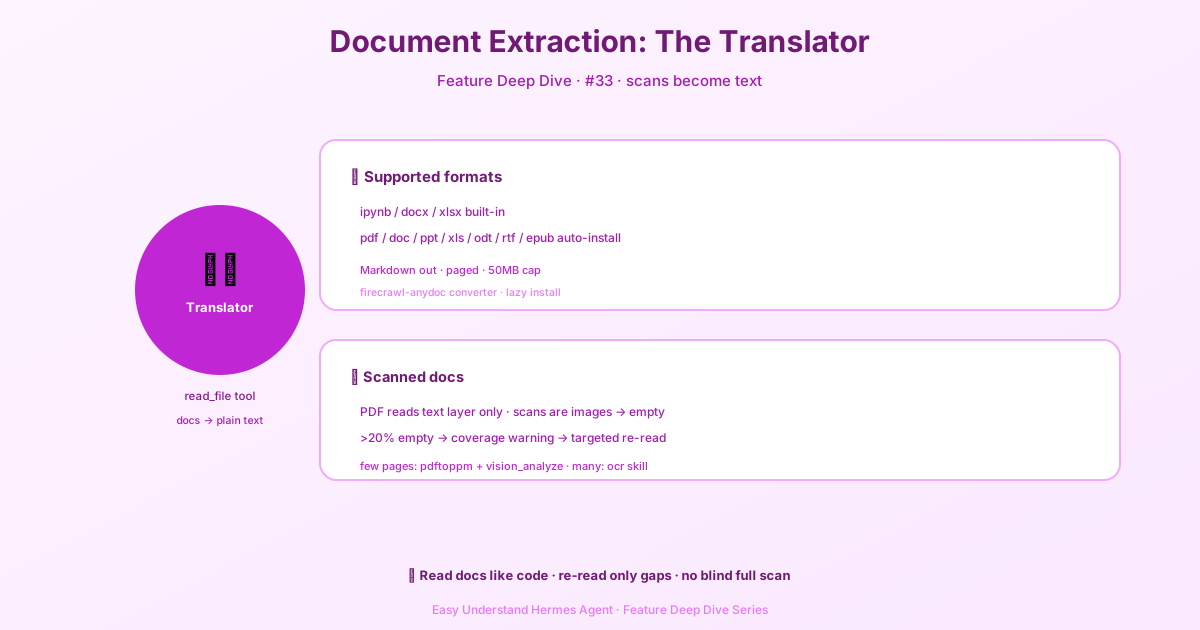
Four Formats, Zero Setup
The most common formats work out of the box, no installation needed:
- Jupyter notebooks (
.ipynb) - Word documents (
.docx) - Excel spreadsheets (
.xlsx) - SQLite databases (
.db,.sqlite,.sqlite3)
These convert to Markdown text and support paginated reading via offset and limit parameters — just like flipping through a book, page by page. SQLite files come back as a schema overview instead of a full dump: each table’s CREATE statement, row count, and first five rows, plus indexes, views, and triggers. The database is opened read-only, so a live one another process holds open is still readable without locks — for anything beyond the preview, query it from the terminal with sqlite3.
Everything Else: Auto-Installed, No Worries
For PDFs, legacy Office files (.doc, .ppt, .xls), OpenDocument, and ebooks (.epub), Hermes automatically installs a converter called firecrawl-anydoc on first use. You don’t lift a finger.
One caveat: if your system config disables auto-install (security.allow_lazy_installs set to false), only the built-in formats work — everything else gets treated as binary. Also, files over 50MB are rejected to avoid excessively long processing times.
Works in Remote Environments Too
Whether your code runs on Docker, Modal, or an SSH remote server, files are automatically transferred back to your local machine for conversion. Reading a document in a sandbox works exactly like reading it locally.
The Big Warning: Scans Are “Fake PDFs”
Here’s the trap: PDF conversion only reads the text layer. If a PDF is a scan (paper contracts, faxes, signed documents), it’s all images — no text layer — and the result is blank.
Hermes detects this intelligently: if more than 20% of pages yield no text (or more than 10 pages absolute), it prepends a warning showing which pages are empty and the last text that appeared before them.
For example:
[EXTRACTION COVERAGE WARNING: 198 of 311 pages in this PDF yielded no text...
  pages 42-77 (36 pages) — after "Antigua Maintenance Corp Bylaws" (p41)
  pages 92-213 (122 pages) — after "... Covenants, Codes and Regulations" (p91)]
Two Ways to Fix It
Case 1: Only a few pages are scans — Use rendering + vision. Convert those pages to images:
pdftoppm -jpeg -r 150 -f 92 -l 94 document.pdf $TMPDIR/pageThen use the vision_analyze tool to “look” at the images. This requires the poppler tools installed on your system (which Hermes uses for detection anyway).
Case 2: Most pages are scans — Use OCR for batch recognition. Hermes has an ocr-and-documents skill based on marker-pdf, supporting 90+ languages and handling formulas and tables. It needs 3–5GB of disk space to install.
Summary
read_file lets AI read nearly every common document format — but remember: a PDF needs a text layer to be read directly. Practical advice: if you regularly handle scans, install the OCR skill upfront. If you only hit a few scanned pages occasionally, use pdftoppm to convert images + vision analysis. Don’t make AI OCR an entire document blindly — read the warning first, process only the truly blank pages, and save both time and effort.
📖 Official Docs
This article is based on the official Hermes Agent documentation:Official docs › user-guide/features/document-extraction