Google Chat: Chat with Your Hermes Agent in Workspace
Connect Hermes Agent to Google Chat — setup guide for chatting with your AI assistant inside Google Workspace.
Google Chat: Give Your AI Assistant a Seat at the Table
Imagine your AI assistant finally has a seat at the office table—right inside Google Chat, where your team already talks all day.
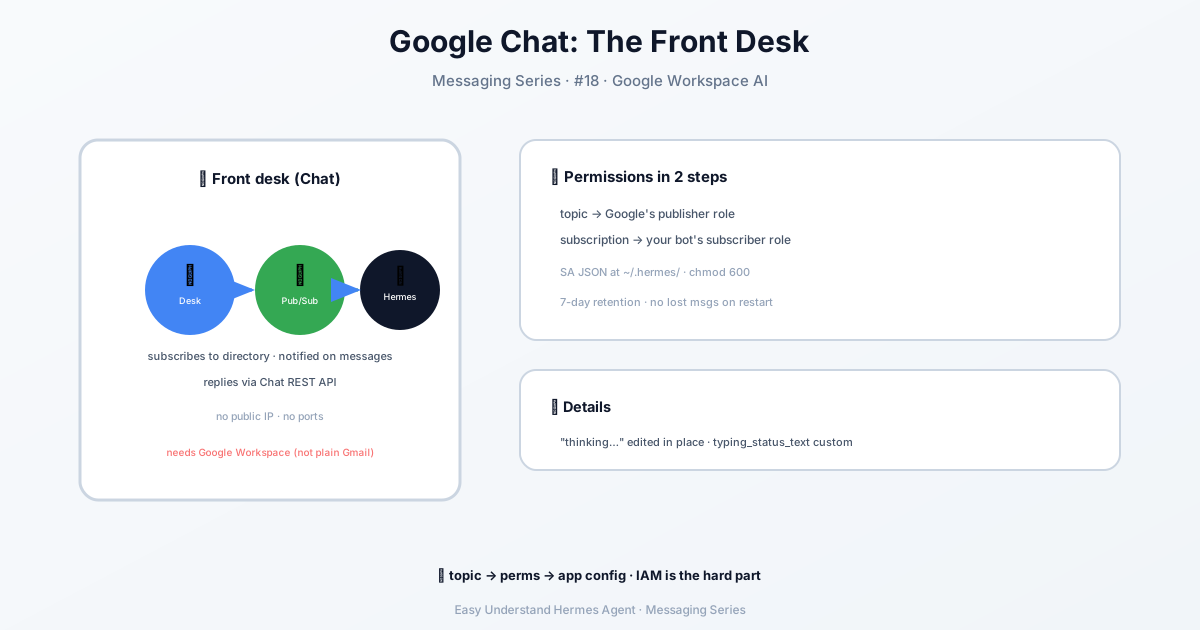
That’s exactly what Hermes Agent delivers. Instead of setting up a public web server, a tunnel, or wrestling with TLS certificates, you connect your bot to Google Chat the same way you’d plug in a pair of headphones: it just works. Hermes listens on a private subscription, and when someone messages the bot, it responds through the Chat REST API. No exposed ports, no firewall rules, no midnight “why is my URL down?” panics.
What You’ll Need
- A Google Cloud project (free tier is fine)
- A Google Workspace account (personal or work, with admin rights)
- About 15 minutes
Step 1: Create a Google Cloud Project
Go to console.cloud.google.com and create a project. Note the project ID—you’ll use it everywhere. Think of it as your bot’s home address.
Step 2: Enable Two APIs
In APIs & Services → Library, enable:
- Google Chat API
- Cloud Pub/Sub API
Both are free for personal bot traffic. Click, enable, done.
Step 3: Create a Service Account (the Bot’s ID Badge)
Go to IAM & Admin → Service Accounts → Create Service Account. Name it hermes-chat-bot. Skip the project-level permissions—you don’t need them.
Then create a JSON key and download it. Store it somewhere safe:
mkdir -p ~/.hermes
mv ~/Downloads/hermes-chat-bot-key.json ~/.hermes/google-chat-sa.json
chmod 600 ~/.hermes/google-chat-sa.json
A common mistake: searching for a “Chat Bot Caller” IAM role. It doesn’t exist. Your bot’s authority comes from being added to a space, not from IAM roles. Don’t overthink it.
Step 4: Create the Pub/Sub Topic and Subscription
In Pub/Sub → Topics → Create topic, use hermes-chat-events as the topic ID. Then create a pull subscription:
- Subscription ID:
hermes-chat-events-sub - Delivery type: Pull
- Message retention: 7 days
This subscription is where Google Chat drops incoming messages. Hermes pulls from it, like checking a mailbox.
Two IAM bindings make this work: on the topic, give chat-api-push@system.gserviceaccount.com the Pub/Sub Publisher role (without it, Google Chat can’t publish events at all). On the subscription, give your service account both Pub/Sub Subscriber and Pub/Sub Viewer—Hermes calls subscription.get() at startup as a reachability check.
Step 5: Connect Hermes Agent
Now the magic. Run:
hermes gateway setupPick Google Chat, and the wizard walks you through the rest. It asks for your project ID, subscription name, and the path to your service account JSON. That’s it.
If you’d rather configure things by hand, the essentials live in ~/.hermes/.env:
GOOGLE_CHAT_PROJECT_ID=my-chat-bot-123
GOOGLE_CHAT_SUBSCRIPTION_NAME=projects/my-chat-bot-123/subscriptions/hermes-chat-events-sub
GOOGLE_CHAT_SERVICE_ACCOUNT_JSON=/home/you/.hermes/google-chat-sa.json
GOOGLE_CHAT_ALLOWED_USERS=you@yourdomain.com
The project ID also falls back to GOOGLE_CLOUD_PROJECT, and the SA path falls back to GOOGLE_APPLICATION_CREDENTIALS. Under a multi-profile gateway, each profile reads its own GOOGLE_CHAT_* settings—a secondary profile never inherits another profile’s credentials.
Install the adapter dependencies with its maintained installer:
python -m plugins.platforms.google_chat.oauth --install-depsOn Docker or hosted images, /opt/hermes/.venv is read-only, so the installer routes packages into HERMES_LAZY_INSTALL_TARGET (/opt/data/lazy-packages in the official image) instead of site-packages. Restart the gateway afterward. The published image also bakes in the [google-chat] extra, so a fresh container doesn’t need a first-boot install.
The Result
You now have an AI bot inside Google Chat. Your team can @mention it, ask questions, trigger automations, or delegate tasks—all without leaving the chat window. No tunnels, no public IP, no certificate renewals.
A couple of nice touches: when the agent asks a multiple-choice question, it renders as a native Card v2 with one button per choice (plus an “Other / type answer” option). And if you want native file attachments—the same drag-and-drop widget humans get—each user runs /setup-files once to authorize the bot. That flow exists because Google’s media.upload endpoint rejects service-account auth; it only accepts user credentials.
Summary & Practical Tip
Hermes Agent turns Google Chat into a command center for your AI workflows. The setup is deliberately simple: a service account for identity, a subscription for listening, and the REST API for replying.
Practical tip: After you finish setup, test with a single direct message to your bot before adding it to a group space. If it replies, you’re golden. If not, check that your service account has the roles/pubsub.subscriber role on the subscription—that’s the #1 cause of silence. If the subscription shows zero undelivered messages, the problem is upstream: verify chat-api-push@system.gserviceaccount.com has Pub/Sub Publisher on the topic.
Now go give your team an AI coworker that actually shows up to the meeting.
📖 Official Docs
This article is based on the official Hermes Agent documentation:Official docs › user-guide/messaging/google_chat