Desktop Native Sign-In: A Smarter Way to Log In
Desktop Native Sign-In — easy-to-understand guide based on official docs
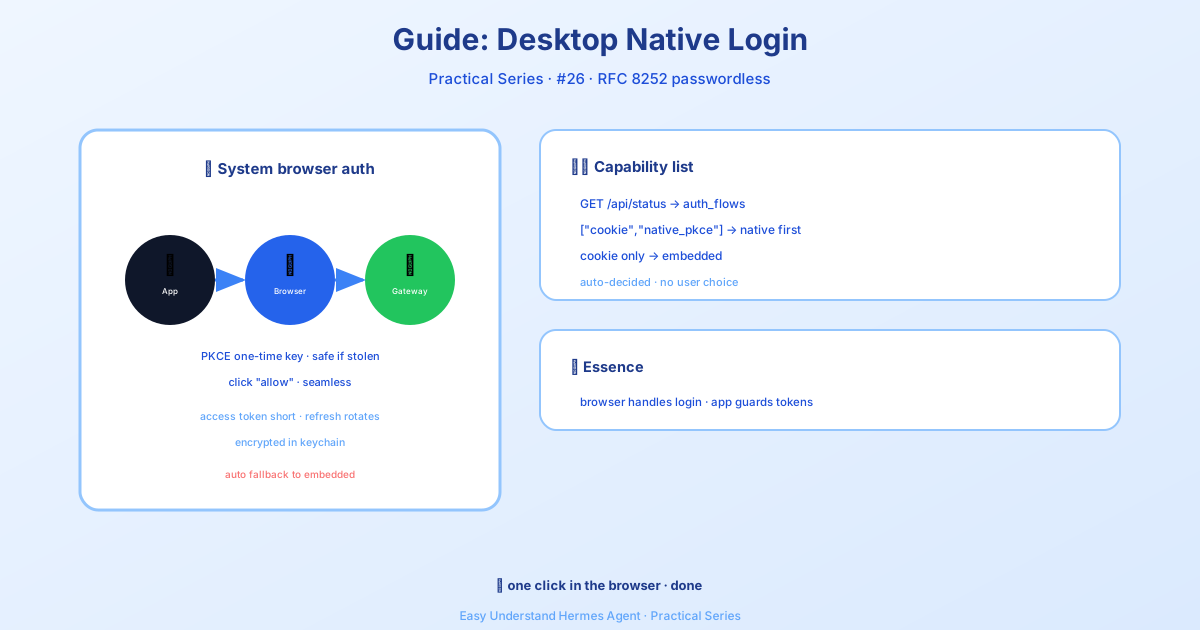
Desktop Native Sign-In: A Smarter Way to Log In
If you’ve ever used the Hermes Desktop app to connect to a gated gateway, you know the drill: a login window pops up, you type your credentials, maybe re-enter your password, and hope your password manager cooperates. It works, but it’s not exactly smooth.
That’s changing. With the latest update, Hermes introduces Desktop Native Sign-In (based on RFC 8252), a more secure and user-friendly way to authenticate. Here’s what’s new and why you’ll like it.
Two Ways to Sign In
When the Hermes Desktop app connects to a gated gateway (a dashboard behind an OAuth provider), it can now use one of two methods:
-
Native sign-in (RFC 8252) — The app opens your real system browser (Safari, Chrome, Firefox, Edge). You approve the login in a browser you already trust, and the app receives tokens it stores securely on your machine. No embedded webview, no session cookies. This is the default whenever the gateway supports it.
-
Embedded sign-in (legacy fallback) — The app opens a small in-app browser window and captures the gateway’s session cookie. This is used automatically when the gateway is an older build that doesn’t advertise native sign-in support.
You don’t have to choose between these — the app detects what the gateway supports and picks the best option automatically.
Why Native Sign-In Matters
Embedding a browser inside a native app for OAuth has well-known problems. The login page can’t see your existing browser session, so you have to re-type credentials and redo multi-factor authentication. Password managers and passkeys often don’t work in embedded views. And the app relies on reading a session cookie from a private webview — which is fragile.
RFC 8252 (“OAuth 2.0 for Native Apps”) is the industry best practice that avoids all of that. The idea is simple: do the authorization in the system browser and hand the app its own tokens.
For Hermes specifically, native sign-in means:
- No embedded webview. Authorization happens in your regular browser, with your logins, extensions, and passkeys intact.
- No session cookies. The app holds an OAuth access token (short-lived) and a refresh token, stored as owner-only files. If you enable the keychain toggle in Settings → Gateway, these tokens are encrypted at rest using your OS keychain (Electron
safeStorage). REST calls and WebSocket tickets are authenticated with anAuthorization: Bearerheader — not a cookie jar.
How It Works
Here’s the flow in plain terms:
- The desktop app opens a loopback listener on
127.0.0.1:<random port>. - It opens your system browser to the gateway’s
/auth/native/authorizeendpoint, starting a PKCE login. - The gateway brokers the flow with the upstream identity provider (like Nous Portal).
- After you approve, the gateway redirects back to the loopback address with a one-time code.
- The app exchanges that code (plus a PKCE verifier) for tokens.
- Tokens are stored locally, and the app uses them for all subsequent requests.
The gateway acts as a broker: it’s the authorization server to the desktop app and an OAuth client to the upstream provider. This is necessary because the upstream client_id and redirect URIs are bound to the gateway’s own origin — a desktop app can’t be a direct client of the Portal. But you still get the full RFC 8252 experience: your own PKCE pair, your own loopback redirect, and tokens you own.
PKCE (RFC 7636) protects the loopback hop. The one-time gateway code is useless without the code verifier, which never leaves the app. The code is single-use and short-lived.
Smart Fallback
The desktop app reads the gateway’s public /api/status endpoint, which advertises an auth_flows array:
["cookie", "native_pkce"]— Gateway supports native sign-in → the app uses it.["cookie"]— Gateway supports only the legacy flow → the app uses the embedded webview.- (field absent) — Older gateway → the app uses the embedded webview.
If native sign-in is advertised but fails for a local reason (e.g., a security tool blocks the loopback listener, or you close the browser tab), the app automatically falls back to the embedded flow so you can still sign in.
Token Lifecycle
- Access token: Short-lived (minutes). Sent as
Authorization: Beareron every REST call and when minting a WebSocket ticket. - Refresh token: Longer-lived and rotating. When the access token nears expiry, the app calls
/auth/native/refreshto rotate both tokens. - Terminal expiry: If the refresh token is dead (expired, revoked, or reuse-detected), the app clears stored tokens and prompts a fresh sign-in.
- Sign out: Clears both native tokens and any legacy session cookie for that gateway.
For Gateway Operators
Native sign-in works automatically on any gated gateway with an interactive session provider registered. No configuration needed — the /auth/native/* routes and auth_flows advertisement are part of the dashboard-auth subsystem.
OAuth providers (like the bundled Nous provider) broker the upstream IDP redirect. Password providers (like the bundled basic-auth plugin) land the system browser on the gateway’s /login form instead — which lets OS password managers autofill the form, something no embedded webview can offer.
The relevant endpoints (all public, pre-auth bootstrap):
GET /auth/native/authorize— starts the brokered PKCE loginPOST /auth/native/token— exchanges the loopback code + verifier for tokensPOST /auth/native/refresh— rotates tokens from the app’s refresh token
See Also
- OAuth over SSH / Remote Hosts — the loopback-callback pattern for provider/MCP OAuth on remote machines.
- Run Hermes with Nous Portal
Native sign-in is a big step forward for security and usability. No more fighting with embedded browsers — just sign in the way you already do, and let Hermes handle the rest.
Keep reading: Hermes Agent pets — Signed in at last? You can also switch on Hermes Agent pets, the purely decorative desktop companions.
📖 Official Docs
This article is based on the official Hermes Agent documentation:Official docs › guides/desktop-native-signin