Tools & Toolsets — AI's Hands
Tools & Toolsets — AI's Hands — easy-to-understand guide based on official docs
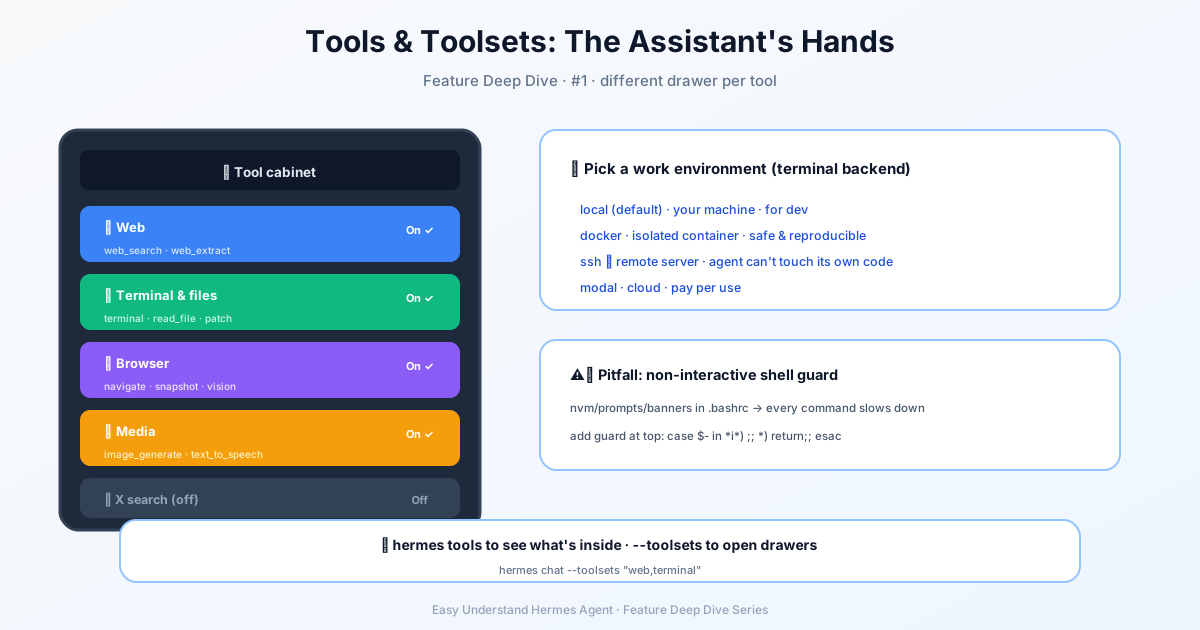
Tools & Toolsets — AI’s Hands
Welcome back to our series! Last time, we talked about what makes Hermes Agent tick. Today, we’re rolling up our sleeves and getting our hands dirty — literally. Because in the world of AI agents, tools are the hands. And Hermes just made getting those hands ready a whole lot easier.
The Two-Minute Miracle
Here’s the good news: you can go from zero to chatting with your AI agent in under two minutes. No PhD required. No wrestling with dependency hell. Just a simple install command.
The easiest path? If you’re on macOS or Windows, just download the Hermes Desktop installer from our website. It handles everything — the command-line app, the desktop app, all of it. One download, done.
Prefer the command line? We’ve got you covered there too:
# Linux / macOS / WSL2 / Android (Termux)
curl -fsSL https://hermes-agent.nousresearch.com/install.sh | bash
Windows users, fire up PowerShell:
iex (irm https://hermes-agent.nousresearch.com/install.ps1)That’s it. Seriously.
What Happens Behind the Scenes?
The installer is like a personal assistant for your computer. It automatically handles:
- Python 3.11 (via
uv, no sudo needed) - Node.js v26 (for browser automation and WhatsApp bridge)
- ripgrep (for lightning-fast file searches)
- ffmpeg (for audio conversion in text-to-speech)
You don’t need to install any of these manually. The installer detects what’s missing and grabs it for you. The only prerequisite? Git. On Linux, make sure curl and xz-utils are available too.
Where Does Everything Go?
Depending on how you install, your files land in different places:
| Installer | Code lives at | hermes binary |
Data directory |
|---|---|---|---|
| Per-user | ~/.hermes/hermes-agent/ |
~/.local/bin/hermes |
~/.hermes/ |
| Root-mode | /usr/local/lib/hermes-agent/ |
/usr/local/bin/hermes |
/root/.hermes/ |
The root-mode layout is perfect for shared machines where one install serves everyone. Per-user config (auth, skills, sessions) still stays private under each user’s ~/.hermes/.
After Installation: Your First Chat
Reload your shell and you’re ready:
source ~/.bashrc   # or: source ~/.zshrc
hermes             # Start chatting!
Want to tweak things later? There’s a command for everything:
hermes model          # Choose your LLM provider and model
hermes tools          # Configure which tools are enabled
hermes gateway setup  # Set up messaging platforms
hermes config set     # Set individual config values
hermes config get     # Inspect individual config values
hermes setup          # Or run the full setup wizard
The Fastest Path: Nous Portal
Here’s a pro tip. Instead of juggling API keys for every tool, use the Nous Portal. One subscription covers 300+ models plus the Tool Gateway — that’s web search, image generation, TTS, and cloud browser all in one.
hermes setup --portalOne command. Logs you in, sets Nous as your provider, and turns on the Tool Gateway. No key juggling, no configuration headaches.
Beyond Built-ins: MCP and Connections
Built-in tools are only part of the story. Hermes can also load tools dynamically from MCP servers, and those show up with the prefix mcp__<server>__ — for example, mcp__github__create_issue for the github MCP server. See the MCP Integration docs at https://hermes-agent.nousresearch.com/docs/user-guide/features/mcp for configuration.
There’s also a single manage_connections tool that handles both kinds of external app. A target is either a managed connector ("gmail" or {"name": "gmail"}, authorized through the Nous gateway) or a local MCP server ({"name": "linear", "mcp": true}, an entry in mcp_servers). Managed actions are status, connect, and reconnect (which repairs only what isn’t connected; force: true restarts a working one). MCP actions — install, enable, and authorize — apply only to mcp: true targets. On the desktop, every action shows a card and blocks until each target is connected, skipped, or the deadline passes; the result lists targets as connected, skipped, or not_connected and carries no link. On surfaces with no card (CLI, TUI, messaging), managed targets return a connect_url per app, and MCP targets return unavailable along with the hermes mcp install <name> / hermes mcp login <name> commands. It can’t disconnect or revoke an account.
One thing to know: the deadline for a single call is five minutes, fixed by the backend when the call starts — reopening the chat or restarting the desktop never extends it. And the tool only appears when the Nous Portal has enabled connectors for the signed-in account (the managed_tools claim on its token), so other sessions won’t see it.
Moving Machines?
Already running Hermes elsewhere? You don’t need to rebuild from scratch:
- Full backup restore:
hermes import - Single agent transfer:
hermes profile import
Just remember: profile exports exclude credentials by design, so for a true backup, use hermes backup.
A Note for the Adventurous
If you’re a developer who wants to contribute or run from a specific branch, you can clone the repo and install from source. Check out the Development Setup section in our Contributing guide for details.
And for the security-conscious? Running Hermes as a dedicated unprivileged user is fully supported. The only step that needs root is Playwright’s --with-deps for browser automation.
Your Hands Are Ready
That’s it. Your AI agent now has hands — tools for searching, browsing, generating images, and more. The installation is the easy part. The fun part is figuring out what you’ll build with them.
Next time, we’ll dive into what those tools can actually do. Until then, happy chatting!
📖 Official Docs
This article is based on the official Hermes Agent documentation:Official docs › reference/tools-reference